
Preview


Description
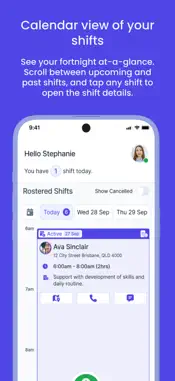
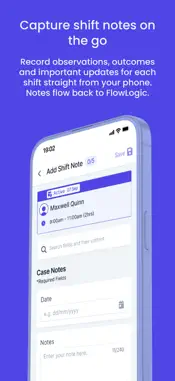
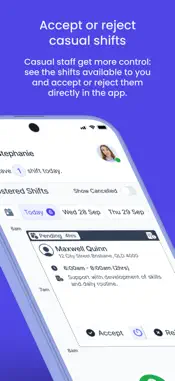
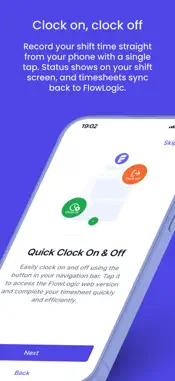
FlowLogic Workforce is the mobile companion for support workers using FlowLogic. View your roster, see participant details, accept casual shifts, write shift notes, and clock on or off, all from your phone, wherever your shift takes you. Built for support workers at NDIS and aged care service providers, FlowLogic Workforce gives you fast, secure access to the shift information you need to deliver great support, without logging in to a desktop or web app. WHAT'S INSIDE PIN code login Set up a secure PIN after your first login and skip the password prompt every time. Log out fully whenever you need to (handy on shared devices). Calendar view of your shifts See your fortnight at a glance. Scroll between upcoming and past shifts, and tap any shift to open the full details. Shift details in one place Date, time, location, the participants you're supporting, special instructions from your provider, all visible before you arrive. Participant and staff profiles View basic details and complete notes for the participants you're supporting and the staff on your shift, where your organisation has enabled this. Clock on, clock off Record your shift time straight from your phone with a single tap. Status shows on your shift screen, and timesheets sync back to FlowLogic for completion. Accept or reject casual shifts Casual staff get more control: see the shifts available to you and accept or reject them directly in the app. Capture shift notes on the go Complete shift notes during or after your shift, and have them save back to FlowLogic. QUICK ACCESS TO MORE Tap through to FlowLogic for incident reports, leave requests and timesheets, without signing in again. COMING SOON We're already working on the next set of features: • Push notifications: alerts for new shifts, changes and clock-on reminders • Shift bidding: view available shifts, bid for them, and get notified once assigned WHO IT'S FOR FlowLogic Workforce is for support workers at organisations that use FlowLogic to manage their workforce. You'll need an active FlowLogic account from your organisation to sign in. If you're not sure whether your organisation uses FlowLogic, check with your manager or scheduling team. GETTING STARTED 1. Download the app 2. Enter your organisation's FlowLogic URL 3. Sign in with your FlowLogic username, password and 2FA (where applicable) 4. Set up your PIN code You'll be ready to view shifts and clock on in minutes. NEED HELP? Visit flowlogic.com.au/support-worker-app for FAQs and contact details or speak to your organisation's FlowLogic administrator.
What's New
Version 1.1.0 2026-09-24
What's new: Complete incident reports, access participants details, and use quick actions to contact or locate participants you're supporting. Technical Analysis
Package Overview Basic metadata
Bundle ID
com.flowlogic.workforce Current Version 1.1.0
Minimum iOS 16.4
Package Size App Store Size
Package Metadata 1 / 1 version records
Detailed binary, privacy manifest, framework, and Info.plist results have not been indexed for this package yet. The verified App Store and archive metadata above remains available.
Developer Information
Known Version Records
1 version record with stored package metadata
Stored metadata does not guarantee a package is currently available to download.
| Details | Version / IDs | Version date | Action |
|---|---|---|---|
| 60.87 MB | v1.0.0 App Store ID: 887176161Build: 1.0.0 | 2026-06-26 03:18:42 | Get Version |