
Preview







Description
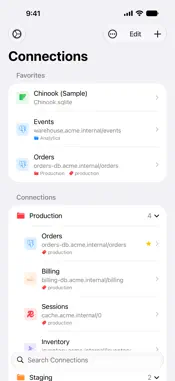
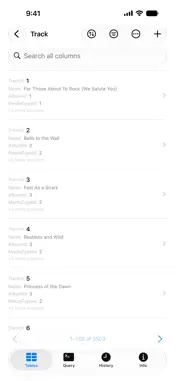
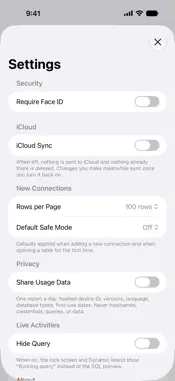
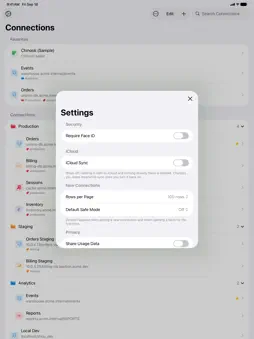
TablePro is a native database client for iPhone and iPad. Browse tables, run queries and edit rows, using the same connections you use in TablePro on the Mac. DATABASES - MySQL and MariaDB - PostgreSQL - Microsoft SQL Server - Oracle - MongoDB - ClickHouse - Redis - SQLite and DuckDB files on your device - TiDB and OceanBase - Amazon Redshift connections synced from the Mac BROWSE - Search tables and page through rows, 50 to 500 at a time - Sort by any column, search text columns, and stack filters with AND or OR - Tap a foreign key to preview the row it points to, then open it - See the columns, indexes and foreign keys of any table - On iPad, the table list sits beside the open table EDIT - Open a row full screen, change values, set NULL and save - View and edit JSON values - Insert and delete rows, truncate or drop a table - Every save, insert and delete runs in a transaction - An open transaction shows on every tab, with Commit and Roll Back - Safe mode for each connection: Off, Confirm Writes or Read-Only QUERY - SQL editor with syntax highlighting - Suggestions for tables, columns and keywords as you type - Run the statement at the cursor or the whole script, and stop it while it runs - Saved queries, synced with your Mac - Copy or export results as JSON, CSV or SQL INSERT statements - Query history for each connection - Follow a running query in a Live Activity on the Lock Screen and in the Dynamic Island CONNECT SECURELY - SSH tunnels with a password, a private key or keyboard-interactive sign-in, with host key checks - SSH jump hosts and two-factor codes - SSL with CA and client certificates - Sign in with AWS IAM or Google Cloud IAM instead of a stored password - Passwords and private keys kept in the Keychain - Lock the app with Face ID, Touch ID or Optic ID WORKS WITH YOUR MAC - iCloud sync of connections, groups, tags and saved queries with TablePro for Mac, off until you turn it on - Password sync through iCloud Keychain, off by default - Continue an open connection on another device with Handoff - Import connections from a .tablepro file through Files or AirDrop ORGANIZE - Favorites, recent connections, groups and tags - Custom icons for connections and groups - A Quick Connect widget for your Home Screen - Shortcuts and Siri actions to open a connection or add rows to a table TRY IT FIRST Open the built-in Chinook sample database to browse, query and edit without setting up a server. PRIVACY Usage data is off unless you turn it on, and it never includes hostnames, usernames, passwords, queries or data.
What's New
Version 1.1 2026-10-27
NEW DATABASES - MongoDB: browse, filter, search and edit collections, and run shell queries - ClickHouse: browse, query and edit tables QUERY - Suggestions for... Technical Analysis
Package Overview Basic metadata
Bundle ID
com.TablePro.TableProMobile Current Version 1.1
Minimum iOS 18.0
Package Size App Store Size
Package Metadata 0 / 0 version records
Detailed binary, privacy manifest, framework, and Info.plist results have not been indexed for this package yet. The verified App Store and archive metadata above remains available.
Developer Information
Known Version Records
0 version records with stored package metadata
Stored metadata does not guarantee a package is currently available to download.
| Details | Version / IDs | Version date | Action |
|---|