
Preview



Description
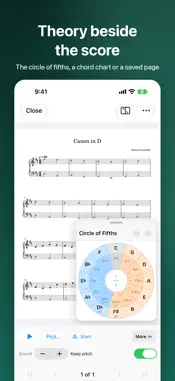
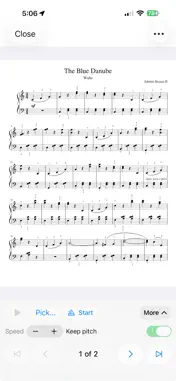
SheetStand is the native PDF sheet-music library for people who keep scores on disk and want one place to catalog, search, and play them — built iPad-first, and on iPhone and Mac. Copy a folder of PDFs into SheetStand’s own iCloud Drive library. Originals stay where they are. Read titles and credits from the page, confirm what looks right, then rename. Play full-screen at the piano with a metronome, backing tracks — including from Apple Music — and a reference beside the music. No SheetStand account required. WHY PEOPLE USE IT • One app instead of unnamed PDFs plus a separate reader • iPad as the music stand — also iPhone and Mac, same library • On-device reading first, and Needs Review before anything is renamed — never silent • Duplicates found in the background, resolved to Recently Deleted • Optional cloud vision fills blanks only, with a key you provide FOUR MODES, ONE APP • Home — recently played, recently added, gathering dust, needs attention • Library — search, filter, sort, Select, open the viewer • Import — Add Folder, Read Scores, Needs Review / Accepted / Duplicates • Settings — naming template, rules, Cloud Vision, storage, Help YOUR LIBRARY (BOOKS-STYLE) When iCloud is on, scores live in SheetStand’s iCloud Drive folder; if it is off, the library stays on this device and a banner says so. Devices on the same Apple ID pick up confirmed metadata after iCloud syncs — your Drive folder, not a SheetStand server. Hide drops a row from Library, Home, and search without deleting the file. Delete Everywhere moves the library copy to Recently Deleted (30 days). Originals you imported from are never touched. READ AND REVIEW Extraction is cheapest-first — PDF metadata, embedded text, Vision OCR, heuristics — and every field keeps a source and confidence badge. Confirming a piece is what allows rename. RENAME AND EXPORT Only confirmed pieces may be renamed, after a dry-run preview; original filenames stay in the catalog. Collisions ask Skip, Keep Both, or Replace. Export Copies writes named PDFs to a folder you pick — copy, never move. PLAY Full-screen viewer: tap the left or right third (or swipe) to turn pages, pinch to zoom. The screen stays awake. • Metronome with a tempo and meter for each piece, plus a count-in • Backing tracks from an audio or MIDI file, a screen recording trimmed to the part you play, or Apple Music: import songs you own, or link a streaming track with your subscription • On Mac, record the sound of another app straight into a backing track • Practice from 0.5× to 1.5×, with or without keeping pitch; a backing follows the score to your other devices • Play a USB or Bluetooth MIDI keyboard through the built-in piano REFERENCE BESIDE THE SCORE Pin a chord chart, the Circle of Fifths, or a saved web page next to the score. On Mac, iPad, and iPhone Duo it sits in a column you can resize (on Duo, split at the fold); on smaller screens it floats in a card you can move and fold away. “Open with this score” brings it back whenever you open that piece. OPTIONAL CLOUD VISION (BRING YOUR OWN KEY) SheetStand never ships an API key or bills you for one. Paste a key from your chosen provider in Settings → Cloud Vision; you pay that provider. It runs after the on-device ladder and only fills blank fields; a value already read from the page is never overwritten. Saving a key makes no network call. PRIVATE BY DESIGN • Local catalog plus your iCloud Drive library — no SheetStand login • API keys stay in the device Keychain — not on our servers • No analytics SDK, no advertising tracking • No subscription SheetStand organizes PDF copies you already have. It does not sell sheet music or grant performance or recording rights. Always verify titles and credits against the score. If you enable a cloud key, that provider processes page images under its own terms. Use of this app is subject to the Terms of Use at app website. Requires iOS/iPadOS 17.0+ and macOS 15.6+.
What's New
Version 2.1.0 2026-11-15
Play along with more of your music. • Apple Music: in a score's audio tray choose Pick… → Apple Music…. Import a song you own to use it like any backing track,...Play along with more of your music. • Apple Music: in a score's audio tray choose Pick… → Apple Music…. Import a song you own to use it like any backing track, or link a streaming track and play it with your Apple Music subscription. A linked track follows the score to your other devices. • Use the sound of a screen recording as a backing track, trimmed to just the part you play. • Keep a backing with a score, or clear it, right from the Pick… menu; Save a Copy saves it as an audio file, and From Another Score reuses one you already attached. • Settings → Performance shows your Apple Music access and opens the right Settings page to change it. Technical Analysis
Package Overview Basic metadata
Bundle ID
com.dashwell.SheetStand Current Version 2.1.0
Minimum iOS 17.0
Package Size App Store Size
Package Metadata 0 / 0 version records
Detailed binary, privacy manifest, framework, and Info.plist results have not been indexed for this package yet. The verified App Store and archive metadata above remains available.
Developer Information
Known Version Records
0 version records with stored package metadata
Stored metadata does not guarantee a package is currently available to download.
| Details | Version / IDs | Version date | Action |
|---|