
Preview


Description
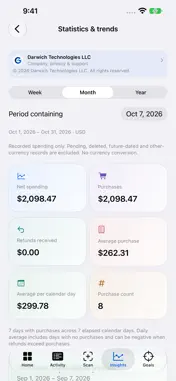
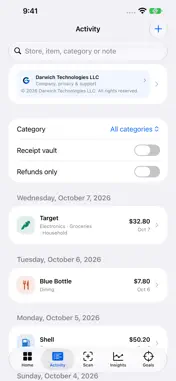
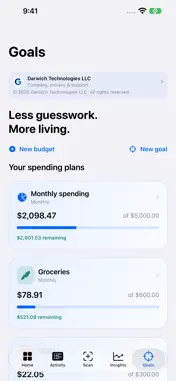
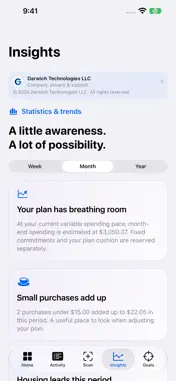
Know where every dollar goes. SpendGuard turns the purchases you record into a clearer spending picture. Scan a receipt, review its items and total, and see how it fits into your plan. CAPTURE AND REVIEW RECEIPTS Scan multi-page receipts with your iPhone camera, import photos or PDFs, or add an expense manually. Review uncertain item names and categories, inspect original receipt text and resolve totals before saving. Remember merchant-specific product names and categories when you choose. Edit saved receipts or reanalyze retained images before applying changes. Initial parsing supports English receipts with US-style prices and dates. UNDERSTAND YOUR PURCHASES Explore spending by day, week, month, year or a custom period. Open Statistics & trends to explore historical periods, net spending, gross purchases, refunds, averages and purchase counts. View spending-over-time, cumulative, purchases/refunds and signed category graphs, with accessible chart data and a shareable summary. Open the spending calendar, search purchases by merchant or item, and inspect merchant visits and category totals. Compare your recorded unit prices for matching products, units and currency. Personal price history uses your records, without external market prices or automatic package-size comparisons. MAKE ROOM FOR WHAT MATTERS Create overall, category or merchant budgets. Reserve fixed commitments and an optional cushion. See your daily allowance and how it is calculated, including assumptions and missing information. Preview a purchase's effect on your plan and track savings goals manually. KEEP CONTROL OF YOUR RECORDS Receipt recognition and spending calculations run on your device. No account or bank connection is required. Export transaction data, share selected receipt images and delete your local records from Settings. Try a separate demo profile with fictional purchases before entering your own. SpendGuard organizes the purchases you record. It does not access your bank balance, move money or convert currencies. Forecasts are estimates and may change when purchases or bills are missing. Notification checks occur when purchases or budgets change. JSON export is not an importable backup. Developed by Darwich Technologies LLC. Support: [email protected]
What's New
Version 1.2.0 2026-10-08
SpendGuard now makes its Darwich Technologies LLC identity, copyright and support details easy to find. Explore new Statistics & trends with historical periods...SpendGuard now makes its Darwich Technologies LLC identity, copyright and support details easy to find. Explore new Statistics & trends with historical periods, net spending, purchases, refunds, averages and purchase counts. View spending-over-time, cumulative, purchases/refunds and category graphs, with accessible chart data and a shareable summary. This update also improves scan/import handling, receipt allocation rounding, edited unit prices, refund integrity and large-text layouts. Technical Analysis
Package Overview Basic metadata
Bundle ID
com.darwichglobal.spendguard Current Version 1.2.0
Minimum iOS 17.0
Package Size App Store Size
Package Metadata 0 / 0 version records
Detailed binary, privacy manifest, framework, and Info.plist results have not been indexed for this package yet. The verified App Store and archive metadata above remains available.
Developer Information
Known Version Records
0 version records with stored package metadata
Stored metadata does not guarantee a package is currently available to download.
| Details | Version / IDs | Version date | Action |
|---|