
Preview




Description
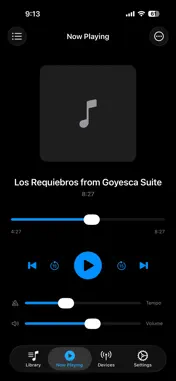
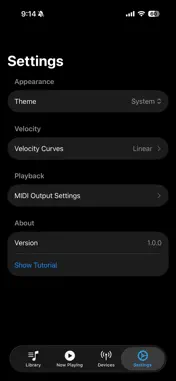
Pianola transforms your MIDI-capable piano into an effortless musical experience. Whether you have a digital piano or an acoustic piano outfitted with a PianoDisc, QRS PNOmation, or Yamaha Disklavier system, Pianola makes playing your favorite songs as easy as do-re-mi. Connect iPhone or iPad to your piano wirelessly via Bluetooth or with a USB MIDI adapter, browse your MIDI file collection, and let the music play! Key Features • Wireless Bluetooth MIDI — Connect to any BLE-MIDI compatible device with a single tap. • USB MIDI Support — Connect using a USB to MIDI adapter or a USB OTG cable on supported devices. • Simple Library Management — Browse MIDI files from your device, iCloud, or network storage. Create playlists to organize your music. • Tempo Control — Speed up or slow down playback. • Velocity Curves — Fine-tune the dynamics to suit your piano and room acoustics. • Pitch Adjustment — Transpose playback in real-time. Great for vocalists who want to sing along. • Background Playback — Music keeps playing while you use other apps. • Ready to Play — Includes a MIDI library to get the party started. Designed for Everyone Pianola offers an interface that feels familiar and intuitive. Large, clear controls. No hidden menus. No overwhelming options. Just the features you need, right where you expect them. Transform your piano into the jukebox it was meant to be!
What's New
Version 1.3 2026-10-27
What's new in Pianola 1.3: • Fixed an issue with background playback. Pianola now keeps playing when your phone is locked, the screen turns off, or when switch...What's new in Pianola 1.3: • Fixed an issue with background playback. Pianola now keeps playing when your phone is locked, the screen turns off, or when switching to another app. Thanks to YaskaEfendi for reporting! • Songs can be in more than one playlist, and playlists remember the order you set. Thanks to drBakerbeats for reporting this! • Removing a song from Recently Played no longer removes it from your playlists. • Choose a default music folder. In Settings › My Files › Music Folder, pick the folder where you keep your MIDI files, such as one in iCloud Drive or on a network drive. Add Songs › My Files will open right there. Great idea, drBakerbeats! • Reset Song Settings. If you've changed a song's tempo or other settings, one tap in the Now Playing menu puts it back to your defaults. • More reliable Bluetooth and USB. Your piano is easier to find, unplugged USB devices disappear from the list, and switching between Bluetooth and USB is smoother. Technical Analysis
Package Overview Basic metadata
Bundle ID
com.djbf.Pianola Current Version 1.3
Minimum iOS 18.0
Package Size App Store Size
Package Metadata 1 / 3 version records
Detailed binary, privacy manifest, framework, and Info.plist results have not been indexed for this package yet. The verified App Store and archive metadata above remains available.
Developer Information
Known Version Records
1 version record with stored package metadata • 3 known version records
Stored metadata does not guarantee a package is currently available to download.
| Details | Version / IDs | Version date | Action |
|---|---|---|---|
| 109.54 MB | v1.2 App Store ID: 882844008Build: 1.2 | 2026-02-27 18:12:37 | Paid / Arcade |
| Not archived | App Store ID: 882395920 | Unknown | Paid / Arcade |
| Not archived | App Store ID: 882132660 | Unknown | Paid / Arcade |