Preview







Description
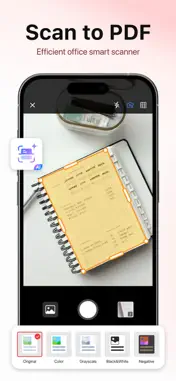
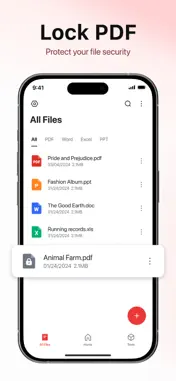
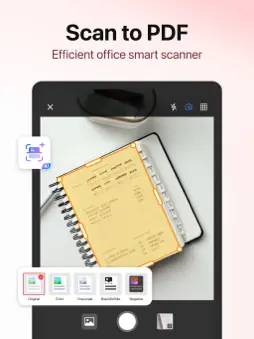
Experience effortless PDF reading, intelligent scanning, and AI-powered editing with PDF Reader, a simple and intuitive app. It offers a centralized hub for scanning, reading, annotating, converting, and managing your documents. Instantly digitize paper files, receipts, notes, and business cards with advanced AI scanning, then edit, convert, and organize them all in one place. Add comments, insert signatures, fill out forms, and complete tasks effortlessly. You can also upload files to the app’s secure cloud, access PDFs from Google Drive and OneDrive, and convert between PDFs and other formats like Word, Excel, images, and more—all in one app available on iPhone and iPad. PDF Viewing and Management -Auto-Discovery: Instantly locates all PDF files on your device. -Seamless Reading: Open and view PDFs smoothly with adjustable modes. -Page Navigation: Jump to specific pages instantly. -Search Functionality: Find files or text in seconds. -AI Summary: Summarize key points quickly. -File to PDF: Convert documents, images, and web pages into PDFs. -PDF to File: Export PDFs to Word, Excel, and images. -Cloud Backup & Access: Upload, view, and edit files in Google Drive or OneDrive. -File Management: Rename, delete, organize, and share PDFs effortlessly. Smart Scanning and Recognition -AI Scan: Capture paper documents, receipts, notes, and books instantly with your camera. -Auto Edge Detection: Automatically detects document borders and adjusts angles precisely. -Image Enhancement: Brightens, sharpens, and removes shadows for perfect scans. -Batch Scan: Scan multiple pages continuously and combine them into one PDF. -OCR Recognition: Extract and copy text from scanned pages with one tap. -AI Classification: Organize scanned files intelligently by type or content. -Scan to PDF: Instantly convert scans into high-quality PDFs ready for sharing or editing. Practical Editing Features -Annotate PDFs: Highlight, underline, and strikethrough key content. -Handwritten Signatures: Sign digital documents easily using your finger or stylus. -Quick Snippet Copying: Extract and reuse content instantly. -Fill & Insert Text: Complete PDF forms directly without file conversion. Office Document Viewing -Word Viewer: Supports DOC and DOCX formats for fast reading. -Excel Viewer: Manage and view XLS and XLSX files easily. -PPT Viewer: View PowerPoint slides in portrait or landscape mode. PDF Conversion -File to PDF: Convert Word, Excel, PowerPoint, Markdown, text, and images into PDF with one tap. -PDF to File: Convert PDFs into Word, Excel, text, images, and PowerPoint formats instantly. Advanced PDF Tools -Merge PDFs: Combine multiple files into one. -Split PDFs: Divide large files into smaller, more manageable sections. -Lock PDFs: Add password protection for sensitive documents. -Compress PDFs: Reduce file size without losing quality. AI-Powered Features -AI Summary: Generate concise summaries for faster review. -AI Scan: Intelligent document scanning with auto recognition and correction. Cloud Backup and Management -Upload to Cloud: Save PDFs securely to cloud storage. -File Protection: Keep your files safe and prevent loss. -Google Drive and OneDrive Integration: Open, edit, and sync files seamlessly across platforms. Download our powerful office app and revolutionize your workflow. Whether you need a document scanner, PDF reader, eBook reader, PDF editor, converter, or manager, this free and lightweight app is built to maximize your productivity. Start your PDF management and scanning journey now—download and experience it today. Privacy Policy: https://getpdfreader.github.io/ipdfreader/privacypolicy.html Term of Use: https://getpdfreader.github.io/ipdfreader/termsofservices.html DO NOT hesitate to contact us if you have any questions. Support Email: [email protected]
What's New
Version 8.8 2026-06-16
- Added AI translation feature. - Fixed known issues and improved stability. We're committed to continuous improvement to meet your expectations. Thanks for you...- Added AI translation feature. - Fixed known issues and improved stability. We're committed to continuous improvement to meet your expectations. Thanks for your support! Technical Analysis
Package Overview Basic metadata
Bundle ID
pdf.reader.editor.office Current Version 8.8
Minimum iOS 17.6
Package Size App Store Size
Package Metadata 1 / 50 version records
4.4 / 5.0 (264 ratings)
Detailed binary, privacy manifest, framework, and Info.plist results have not been indexed for this package yet. The verified App Store and archive metadata above remains available.
Developer Information
Known Version Records
1 version record with stored package metadata • 50 known version records
Stored metadata does not guarantee a package is currently available to download.
| Details | Version / IDs | Version date | Action |
|---|---|---|---|
| Not archived | App Store ID: 873929605 | Unknown | Request Version |
| Not archived | App Store ID: 873750598 | Unknown | Request Version |
| Not archived | App Store ID: 873689792 | Unknown | Request Version |
| Not archived | App Store ID: 873391519 | Unknown | Request Version |
| Not archived | App Store ID: 873132250 | Unknown | Request Version |
| Not archived | App Store ID: 873048124 | Unknown | Request Version |
| Not archived | App Store ID: 872684994 | Unknown | Request Version |
| Not archived | App Store ID: 872641832 | Unknown | Request Version |
| Not archived | App Store ID: 872619953 | Unknown | Request Version |
| Not archived | App Store ID: 871161756 | Unknown | Request Version |