
Preview


Description
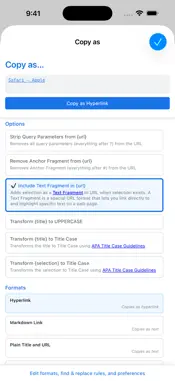
Transform any webpage content into perfectly formatted text with just one click. Copy as Extension lets you instantly copy page titles, URLs, and selected text using customizable templates with smart variables like {title}, {url}, {selection}, {date}, and {time}. Choose from built-in formats like Markdown links, citations, and quotes, or create your own custom templates. Copy as plain text or rich hyperlinks that work seamlessly in Word, Google Docs, Outlook, and other applications. Powerful customization meets effortless workflow. Configure find & replace rules to automatically transform content before formatting — perfect for cleaning up URLs, standardizing company names, or modifying text on the fly. Intelligent text transformations include APA-compliant Title Case, UPPERCASE, and lowercase options with smart mutual exclusion that automatically prevents conflicts. The live preview shows exactly what you'll copy, including all transformations. Text Fragment support automatically creates shareable highlight links that scroll directly to selected text. Use Quick Copy via right-click context menus for instant copying with your preferred format and rules. Send to API lets you go beyond copying by sending formatted content directly to external services and APIs like Trello, Notion, Slack, or any custom endpoint. Define multiple API configurations with variable substitution in URLs, headers, and JSON bodies, and choose HTTP methods including GET, POST, PUT, PATCH, and DELETE. Integrate find & replace rules, dynamic permission requests, and success/error notifications with progress indicators for a smooth and secure experience. Whether you're creating tasks, posting messages, or saving bookmarks, Send to API turns Copy as Extension into a one-click automation tool for the web. Privacy-first design with zero data collection. The extension works entirely locally with no external servers, tracking, or data transmission. It only accesses page content when you actively use it, requiring minimal permissions while delivering maximum functionality. Enhanced selection handling intelligently captures image alt-text and maintains proper text flow, ensuring you get clean, professional results every time. Available for Chrome and other Chromium-based browsers.
What's New
Version 1.7.0 2026-08-28
Added support for copying multiple tabs. Technical Analysis
Package Overview Basic metadata
Bundle ID
dev.dcwalker.Copy-as Current Version 1.7.0
Minimum iOS 15.0
Package Size App Store Size
Package Metadata 0 / 4 version records
Detailed binary, privacy manifest, framework, and Info.plist results have not been indexed for this package yet. The verified App Store and archive metadata above remains available.
Known Version Records
0 version records with stored package metadata • 4 known version records
Stored metadata does not guarantee a package is currently available to download.
| Details | Version / IDs | Version date | Action |
|---|---|---|---|
| Not archived | App Store ID: 884179987 | Unknown | Request Version |
| Not archived | App Store ID: 884161434 | Unknown | Request Version |
| Not archived | App Store ID: 882461969 | Unknown | Request Version |
| Not archived | App Store ID: 882322532 | Unknown | Request Version |