
Preview

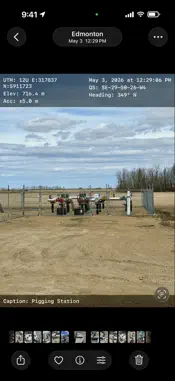

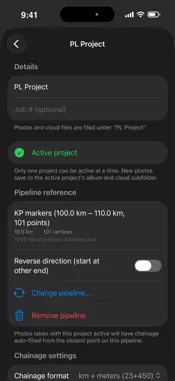


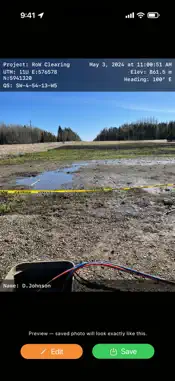
Description
Inspection Context Pics turns your iPhone into a field-documentation camera. Every photo is stamped — both as a readable overlay burned into the image and as proper EXIF metadata — so the who, where, and when travel with the file no matter where it ends up. WHAT GETS STAMPED • GPS coordinates (decimal degrees or degrees-minutes-seconds) • Legal Subdivision / Quarter Section (Dominion Land Survey) • Elevation • Compass heading • Date and time • Pipeline KP / chainage • Your own custom fields and caption BUILT FOR THE FIELD • Volume-button shutter for quick capture, even with gloves on. • Front camera switcher for site sign-in shots. • Works in any orientation. • Choose your output resolution per overlay style. • Photos save straight into per-project albums in your library. LOCK SCREEN QUICK ACCESS (NEW in 1.4) Add the Inspection Camera widget to your lock screen, or — on iOS 18 — assign the Inspection Camera Control to a lock-screen corner slot or Control Center. Tap once, unlock, and you're in the camera. No hunting for the app icon. PIPELINE CHAINAGE Attach a pipeline KMZ to a project and the KP / chainage field fills in automatically from where you're standing. Supports km+metres, 100 m stationing, and 100 ft stationing, surveyed KP markers or centerline geometry, and warns you when you've wandered off the line. A signed per-project offset lets you match centerline files that don't start at 0+000. PROJECTS & OVERLAY STYLES Set up multiple projects, each with its own album, job number, and overlay layout. Save different overlay styles and switch between them in a tap. Share an entire setup — projects and styles together — as a single file so your whole crew shoots with identical settings. Optionally save an unstamped copy of every photo alongside the stamped one. STAMP EXISTING PHOTOS Bring a photo in from your library and apply the same overlay using the location stored in the photo. PRIVATE BY DESIGN Everything happens on your device. No account, no sign-in, no servers, no analytics, no tracking. Your photos and project data never leave your phone unless you choose to share them. Made for inspectors, surveyors, and anyone who needs their photos to carry their context.
What's New
Version 1.4 Ready for Distribution 2026-09-04
Version 1.4 — Lock Screen quick access + camera improvements. NEW — Lock Screen widget Add "Inspection Camera" to your lock screen (long-press → Customize → Lo... Technical Analysis
Package Overview Basic metadata
Bundle ID
com.RideoutAppDev.Inspection-Context-Pics Current Version 1.4 Ready for Distribution
Minimum iOS 17.6
Package Size App Store Size
Package Metadata 1 / 3 version records
Detailed binary, privacy manifest, framework, and Info.plist results have not been indexed for this package yet. The verified App Store and archive metadata above remains available.
Developer Information
Known Version Records
1 version record with stored package metadata • 3 known version records
Stored metadata does not guarantee a package is currently available to download.
| Details | Version / IDs | Version date | Action |
|---|---|---|---|
| 5.07 MB | v1.3 App Store ID: 886203036Build: 1.3 | 2026-05-27 22:30:45 | Paid / Arcade |
| Not archived | App Store ID: 885646124 | Unknown | Paid / Arcade |
| Not archived | App Store ID: 885210460 | Unknown | Paid / Arcade |