
Preview


Description
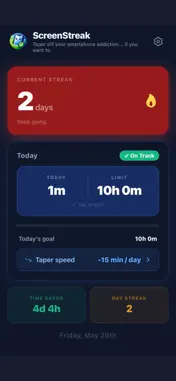
Most screen time apps don't work. They block apps cold turkey. Your willpower lasts three days. Then you disable the block and you're right back where you started — except now you feel worse about it. ScreenStreak works differently. It uses gradual tapering — reducing your daily limit by just a few minutes each day. Small enough that you barely notice. Consistent enough that it actually sticks. By the time you reach your goal, the habit is yours. Not the app's. HOW IT WORKS Find your 7-day screen time average in Settings → Screen Time → See All Activity (iPhone). Enter it as your baseline. Choose a taper speed — 5, 10, or 15 fewer minutes per day. Your limit drops automatically every day you succeed. Fail a day and the limit holds — giving you another shot at the same goal before moving on. Reach 30 minutes and the app locks there. Habit built. That's it. No permissions. No tracking. Just you, your numbers, and a streak worth protecting. THE HONEST PART You may notice boredom, restlessness, or the urge to check your phone — especially early on. That's normal. It won't always be easy. You might fail before lasting change sticks. Reset and keep going. The streak is a tool, not a verdict. FOR FAMILIES ScreenStreak is built to be used together, not imposed from above. Set the reduction speed collaboratively. Let them own their streak. Tapering works because it's a choice — not a punishment. FEATURES -100% manual — you enter your screen time each day. No permissions required. We don't read your data, ever. -Taper speed: 5, 10, or 15 minutes less per successful day — fail and the limit holds until you succeed -Streak counter with a 2-day grace window for missed days -Time Saved — tracks cumulative minutes saved vs your original 7-day average, not just today's goal -Glitch protection — flag Apple Screen Time miscalculations without breaking your streak -Smart warnings — the app alerts you when your streak is at risk before it's too late -Weekly recalibration — only suggested when your usage is consistently above your taper goal, never when you're doing well -Struggling? After 3 tough days the app suggests a gentler taper speed -Taper to 30 — one tap to finish the final stretch when you're close to the goal -Hold at 1 hour level— lock your limit when you're happy with where you are -Update your baseline anytime — even after hitting 30 minutes, you can reset and start fresh -Optional 8 PM daily reminder. Screen Streak
What's New
Version 1.1 2026-05-13
Updated design Technical Analysis
Package Overview Basic metadata
Bundle ID
com.screenstreak.app Current Version 1.1
Minimum iOS 15.1
Package Size App Store Size
Package Metadata 0 / 2 version records
Detailed binary, privacy manifest, framework, and Info.plist results have not been indexed for this package yet. The verified App Store and archive metadata above remains available.
Developer Information
Known Version Records
0 version records with stored package metadata • 2 known version records
Stored metadata does not guarantee a package is currently available to download.
| Details | Version / IDs | Version date | Action |
|---|---|---|---|
| Not archived | App Store ID: 885543778 | Unknown | Request Version |
| Not archived | App Store ID: 883683412 | Unknown | Request Version |