
Preview






Description
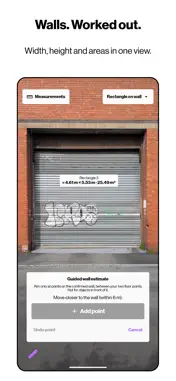
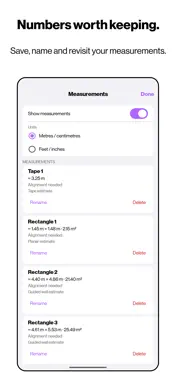
Yardstick is a tape measure rebuilt around the camera. It takes the most familiar tool in the drawer and gives it a new way of working: point, place, and let the measurement follow the world as it actually is. A tool that follows the surface Most measuring apps assume the world is flat. Yardstick doesn't. Start with a point on the ground and chain segments one after another. Horizontal segments follow the real surface beneath them, so a path across a sloping driveway, lawn or floor is measured along the ground rather than through the air. Switch to vertical to rise up a wall, post or doorframe, then continue from the top. Closing the loop Aim back at your starting point and the loop closes itself. Yardstick returns the perimeter and, for level shapes, the area. No arithmetic, no sketches on the back of an envelope. Point to point, when that's all you need For quicker jobs, a set of focused measurements sits alongside the tape: distance, horizontal distance, height, path, perimeter, area and rectangle, each placed directly on real surfaces. Walls, handled deliberately Mark where a wall meets the floor and Yardstick understands the plane it sits on, so rectangles, heights and distances on that wall can be taken with confidence. Honest by design Precision is only useful when it is truthful. Yardstick shows whether each point rests on a mapped or an estimated surface, flags readings that a slight wobble could throw off, and declines to place points it cannot measure reliably. It works on iPhones with and without LiDAR. Kept, not lost Every measurement can be saved, renamed and revisited, shown in metric or imperial, and shared as text. Measurements are estimates and depend on lighting, surface detail and distance. For critical work, confirm with a physical tape.
What's New
Version 2.0 2026-10-01
Bug fixes and other improvements. Technical Analysis
Package Overview Basic metadata
Bundle ID
com.dan.ios.ARMeasure Current Version 2.0
Minimum iOS 17.6
Package Size App Store Size
Package Metadata 0 / 0 version records
Detailed binary, privacy manifest, framework, and Info.plist results have not been indexed for this package yet. The verified App Store and archive metadata above remains available.
Known Version Records
0 version records with stored package metadata
Stored metadata does not guarantee a package is currently available to download.
| Details | Version / IDs | Version date | Action |
|---|