
Preview


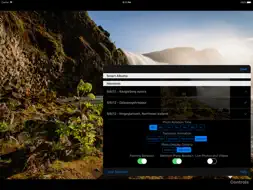

Description
TURN YOUR IDEVICE INTO A DIGITAL PICTURE FRAME. *************************************************** This app uses the synced albums in your Photos app, including your shared photo albums. You can select one or more albums or moments to turn your iPad, iPhone, or iPod into a digital picture frame. >>>>>>GREAT USE FOR THAT OLD iPAD 2<<<<<< If you use shared photo albums, your digital picture frame will even update live! UTILITY ******** Your old, unloved iPad could be the smartest picture frame ever. Let it sit in the kitchen and display pictures until you need to surf the web for a recipe. Then pop up iDigiFrame again. Use your plus-sized iPhone as a digital picture frame at work. ROTATION *********** You can select continuous or random rotation. TIME ***** You can select from rotation times of 15sec, 30sec, 1min, 5min, 15min, 30min, or 1hr. TRANSITIONS ***************** You can select from four different transitions or have them apply randomly. DISPLAY OPTIONS *********************** You can show your pictures in aspect fit or aspect fill. ORIENTATION ************** Display your digital picture frame in landscape or portrait orientation. Your pictures will adjust automatically. MOVING PICTURES! ****************** The Full Access auto-renewing annual subscription lets you see your Live Photos in motion and plays videos in your albums with the same rotation time as your pictures. If you don't have Full Access, you'll still see your Live Photos, they just won't move. See the subscription fine print information at the bottom. SUPPORTED DEVICES ********************* Any iDevice that can run iOS 9. I'm not sure you'd really want to use an iPhone 4s, but you could. FEEDBACK *********** This is a one-person operation, so I'm very receptive to your feedback. Let me know what other features you would like to see at: www.mandevilprogramming.com SUBSCRIPTION FINE PRINT ************************* At confirmation of purchase, payment will be charged to your iTunes account. Your subscription will automatically renew unless auto-renew is turned off no less than 24 hours before the end of the current subscription period. Your account will be charged for renewal within 24 hours of the end of the current subscription period. Automatic renewals are at full price. You can manage your subscriptions or turn off auto-renewal in your Account Settings on the App Store. Terms of use and privacy policy are at www.mandevilprogramming.com.
What's New
Version 3.2 2019-05-15
Added a panning option for panoramic photos in Aspect Fit or all photos in Aspect Fill. No subscription is required for this feature. Technical Analysis
Package Overview Package analysis available
Bundle ID
com.mandevilprogramming.iDigiFrame Current Version 3.2
Minimum iOS 9.3
Package Size App Store Size
Package Metadata 1 / 3 version records
Purchases
org.cocoapods.Purchases v2.2.0iOS 9.0+327.89 KB
3.8 / 5.0 (4 ratings)
Developer Information
Known Version Records
1 version record with stored package metadata • 3 known version records
Stored metadata does not guarantee a package is currently available to download.
| Details | Version / IDs | Version date | Action |
|---|---|---|---|
 38.2 MB | v3.2 App Store ID: 830246019Build: 2 | 2019-05-11 11:54:32 | Get Version |
| Not archived | App Store ID: 830201994 | Unknown | Request Version |
| Not archived | App Store ID: 824451450 | Unknown | Request Version |