Preview



Description
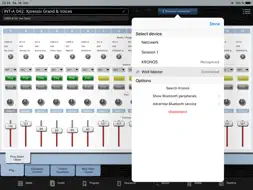
The KronosRemote allows you to control the famous Korg Kronos workstation from your iPad and helps you getting the maximum performance out of your Kronos. It focuses on live situations on stage to give you easy access to common pages and parameters even when the Kronos screen is not in reach or not visible. In the studio it will support your programming workflow by providing a second screen on which you can have direct access to important pages like the combi mixer while editing other pages on the Kronos screen (it does not substitute the Kronos for programming though). A wireless connection via Bluetooth supports program changes and realtime controllers and is a convenient way on stage to control your live setup in every situation. A connection via USB cable fully supports SysEx communication and features synchronisation of all preset parameters, thus being the perfect choice during programming in your studio. Please note: the KronosRemote is designed as a supplement to the Kronos screen, due to technical reasons many pages are only available on the Kronos screen and are not accessible from the app. __________________________________________ SETLIST A setlist view similar to the Kronos setlist screen allows quick changes between program / combi and song presets. Optionally the app can change the mode on the Kronos and for example show the combi mixer page while your iPad still lets you access your current setlist. You can assign .pdf files or even .mp3 files to setlist slots. .pdf files will be displayed instead of the comment field while .mp3 files bring up a mini-player - all within the setlist screen. Slots and setlists can conveniently be edited including drag & drop slots / use the onscreen keyboard to input text / copy & paste chords or lyrics to your comments. And you can even do that offline - prepare your setlist backstage on the iPad, add new songs or move your songs in the right order, edit your comments, add leadsheets... and transfer all changes to your Kronos later when you're connected. - Default setlist mode with slots, zoomable and scrollable - Add .pdf and .mp3 files to your setlist slots - Extensive setlist editing capabilities - Select slot preset directly from setlist mode instead of changing forth and back between the modes - Undo feature - A realtime controller bar features controls like ribbon controller, knobs and silders or the 8 universal pads without hiding your setlist __________________________________________ COMBINATION The mixer page and additional common editing pages can be displayed and used on the iPad. While editing on the iPad is more convenient than the Kronos touchscreen, this mode allows you to view two editing pages at the same time - like adjusting EQ settings on the Kronos screen and editing mixer settings on the iPad. When you're done editing use the iPad keyboard to give your Combi a name and save it from the iPad. __________________________________________ PROGRAM Program mode lets you change presets and offers the same access to the realtime controller surfaces as the other modes. Also you can use the iPad keyboard to rename programs. __________________________________________ SEQUENCER The mixer and EQ pages for MIDI and Audio are available in Sequencer mode. Use the iPad to always have your hands on the mixer while you're working on your tracks or effects. __________________________________________ Please note • USB connection requires the iPad camera kit or USB-lightning adapter • For a bluetooth connection an additional bluetooth MIDI dongle on the Kronos side is required. Bluetooth is only available on devices which support Bluetooth LE specification, this should be all devices above (not including) the iPad 2 • The app fully supports iPad 2 or prior but will be slow on these devices, mostly during syncing processes. Program changes and realtime controllers work fine. • Additional infos and FAQ can be found at www.kronos-remote.com
What's New
Version 1.9.6 2022-09-14
Fixed issues with external input devices (footswitches, external keyboards...). Technical Analysis
Package Overview Basic metadata
Bundle ID
DL.RemoteApps.KronosRemote Current Version 1.9.6
Minimum iOS 9.3
Package Size App Store Size
Package Metadata 0 / 31 version records
Detailed binary, privacy manifest, framework, and Info.plist results have not been indexed for this package yet. The verified App Store and archive metadata above remains available.
Developer Information
Known Version Records
0 version records with stored package metadata • 31 known version records
Stored metadata does not guarantee a package is currently available to download.
| Details | Version / IDs | Version date | Action |
|---|---|---|---|
| Not archived | App Store ID: 852211488 | Unknown | Paid / Arcade |
| Not archived | App Store ID: 849862576 | Unknown | Paid / Arcade |
| Not archived | App Store ID: 840167721 | Unknown | Paid / Arcade |
| Not archived | App Store ID: 839971634 | Unknown | Paid / Arcade |
| Not archived | App Store ID: 839856101 | Unknown | Paid / Arcade |
| Not archived | App Store ID: 839797508 | Unknown | Paid / Arcade |
| Not archived | App Store ID: 839741206 | Unknown | Paid / Arcade |
| Not archived | App Store ID: 833448495 | Unknown | Paid / Arcade |
| Not archived | App Store ID: 833137749 | Unknown | Paid / Arcade |
| Not archived | App Store ID: 832049320 | Unknown | Paid / Arcade |
| Not archived | App Store ID: 830235805 | Unknown | Paid / Arcade |
| Not archived | App Store ID: 829609692 | Unknown | Paid / Arcade |
| Not archived | App Store ID: 829003997 | Unknown | Paid / Arcade |
| Not archived | App Store ID: 828983989 | Unknown | Paid / Arcade |
| Not archived | App Store ID: 828929523 | Unknown | Paid / Arcade |
| Not archived | App Store ID: 828844749 | Unknown | Paid / Arcade |
| Not archived | App Store ID: 827313757 | Unknown | Paid / Arcade |
| Not archived | App Store ID: 825615587 | Unknown | Paid / Arcade |
| Not archived | App Store ID: 824374856 | Unknown | Paid / Arcade |
| Not archived | App Store ID: 824321730 | Unknown | Paid / Arcade |
| Not archived | App Store ID: 821996945 | Unknown | Paid / Arcade |
| Not archived | App Store ID: 821549460 | Unknown | Paid / Arcade |
| Not archived | App Store ID: 821457638 | Unknown | Paid / Arcade |
| Not archived | App Store ID: 821401545 | Unknown | Paid / Arcade |
| Not archived | App Store ID: 820874646 | Unknown | Paid / Arcade |
| Not archived | App Store ID: 820828524 | Unknown | Paid / Arcade |
| Not archived | App Store ID: 820557690 | Unknown | Paid / Arcade |
| Not archived | App Store ID: 820398546 | Unknown | Paid / Arcade |
| Not archived | App Store ID: 820186437 | Unknown | Paid / Arcade |
| Not archived | App Store ID: 820156593 | Unknown | Paid / Arcade |
| Not archived | App Store ID: 820117345 | Unknown | Paid / Arcade |