
Preview



Description
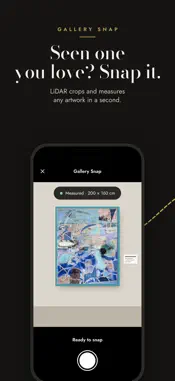
Placed shows you exactly how artwork looks on your walls — not a stock photo, not a rough overlay, your real space with real lighting. Discover new work from independent artists, snap a piece you’ve seen in a gallery, or bring your own collection. Either way, Placed puts it on your wall before you commit. Point your iPhone at a wall. Placed uses LiDAR and ARKit to measure dimensions, read the lighting and map the surfaces automatically — no tape measure, no typing in numbers, no guessing. WHAT MAKES PLACED DIFFERENT Most art preview apps give you sample interiors or ask you to type in measurements. Placed scans your room and builds a real understanding of your space: Automatic wall measurement — LiDAR captures accurate dimensions without you lifting a finger Adaptive lighting & colour — Placed reads the colour temperature of your room so artwork blends naturally, keeping whites creamy and mid-tones bright even in warm, lamp-lit rooms Realistic framing — frames, mounts, canvas sides, glazing and shadows rendered as they’d really sit on the wall Object occlusion — if a lamp, chair or TV sits in front of the wall, the artwork layers behind it realistically Angle correction — photograph from any angle and the artwork still sits true GALLERY SNAP Seen something you love at a gallery, art fair or friend’s house? Photograph it and preview it in your own room. Placed can size it in one of three ways: With LiDAR on supported iPhones By reading the dimensions from the gallery label From a size you enter yourself DISCOVER NEW WORK Browse artwork from independent artists and public domain collections, right on your own wall. Filter by colour, size, orientation, medium, genre and availability. If you find something you love, send an enquiry and we’ll pass your details to the artist. New work is added every week. BROWSE, RIGHT ON THE WALL Swipe directly on the artwork to move through Discover or your own collection. Each piece settles into place at the correct scale in seconds. Tap to inspect a piece up close, or tap the wall to reposition, resize and reframe. HANG MORE THAN ONE PIECE Choose pairs, stacks, rows, columns or gallery grids, and fill each slot from your collection or Discover. Placed spaces and centres every arrangement using real gallery hanging conventions. YOUR OWN COLLECTION Already have art? Import it from your photos, or share images straight to Placed from other apps. Placed spots likely duplicates before you import and helps you tidy your existing collection. You choose what stays, and your original photos are never touched. Whether you have five pieces or five hundred, browse them all as quickly as you’d scroll a photo album. YOUR WALLS + SAMPLE WALLS Placed is built for your own spaces first. It also includes a curated set of sample interiors — living rooms, bedrooms, offices, gallery walls — for trying art in a different setting or sharing a polished preview with a buyer. WHO PLACED IS FOR Collectors discovering their next piece Gallery-goers wondering how a piece would look at home Artists previewing work before a studio visit or fair Interior designers showing clients art in their actual rooms Anyone redecorating who wants to try before they nail it to the wall Placed uses Apple’s LiDAR sensor (iPhone Pro models) for fully automatic wall mapping and the most accurate occlusion. On other iPhones, Placed works via ARKit. You’ll fine-tune wall alignment with a simple on-screen grid, and occlusion is less precise. Privacy Policy: https://placed-legal.pages.dev/privacy-policy Terms of Use (EULA): https://www.apple.com/legal/internet-services/itunes/dev/stdeula/
What's New
Version 1.0.21 2026-11-19
Bring the art you discover into your own space. Improved Gallery Snap: Photograph an artwork, review its crop and preview it at scale on your wall or a sample ...Bring the art you discover into your own space. Improved Gallery Snap: Photograph an artwork, review its crop and preview it at scale on your wall or a sample interior. Snap now, choose your wall later: There’s no need to photograph your own room first—ideal when you’re out discovering art. My Interiors and Sample Walls: Choose between your saved interiors and our sample walls. If you haven’t added an interior yet, sample walls appear first. Your snaps are kept: Captured artworks are saved privately on your device. Unfinished captures appear in My Artworks as “Needs review,” so you can return to them later. A simpler start: Begin by snapping an artwork, photographing your space or trying a sample wall. Improved artwork selection, crop review and measurement feedback, alongside refinements to artwork rendering, frames and lighting. Technical Analysis
Package Overview Basic metadata
Bundle ID
com.superapp.placed7n5p5 Current Version 1.0.21
Minimum iOS 17.0
Package Size App Store Size
Package Metadata 0 / 0 version records
Detailed binary, privacy manifest, framework, and Info.plist results have not been indexed for this package yet. The verified App Store and archive metadata above remains available.
Known Version Records
0 version records with stored package metadata
Stored metadata does not guarantee a package is currently available to download.
| Details | Version / IDs | Version date | Action |
|---|