
Preview




Description
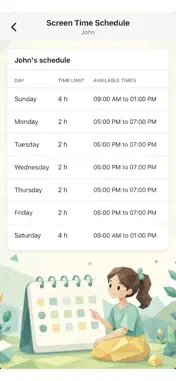
3Eyes puts your family's screen time in your pocket. The 3Eyes mobile app is the parent companion to the 3Eyes Windows agent. Pair it with your child's Windows PC at 3eyes.app and you can review activity, approve requests, and keep schedules on track from anywhere — no extra setup on your phone beyond signing in. WHAT YOU CAN DO • Screen time schedules — Set per-day time limits and allowed hours for each child. Drag two handles to pick when they can use the computer; copy the same rules to every day of the week in one tap. • Approve requests instantly — When a child asks for more time, requests a blocked website, or triggers a security event, you get a push notification on your phone. Approve or deny right from the lock screen, or open the app to pick a custom duration (15 min, 30 min, 1 hour, 2 hours, or your own number). • Manage allowed and blocked websites — Browse, search, and edit each child's whitelist and blacklist. Add sites by URL, handle, or paste; type to filter the list in real time. • Curate YouTube channels — Decide which YouTube channels your kids can watch by adding them with a URL, handle, or channel ID. Hide default channels you'd rather not see on the Videos page. • Weekly analytics — See exactly how each child spent their week with a clean per-day usage chart, total time, and the top apps they used. • Push notifications you can act on — Every pending request, security event, and time-extension ask is delivered as a rich iOS notification with one-tap approve / deny actions. HOW IT WORKS 1. Set up your family on the 3Eyes Windows agent. 2. Sign in to this app with the same account. 3. Pick a child to manage their schedule, filters, requests, and chat. The app needs an active 3Eyes account and at least one paired Windows or Mac device. SUPPORT Need help? Email [email protected] or tap "Learn More" inside the app for in-context guides.
What's New
Version 1.2 2026-08-11
added new icons in one view , fixed an issue that caused some crashing Technical Analysis
Package Overview Basic metadata
Bundle ID
com.3Eyes.Corp Current Version 1.2
Minimum iOS 15.0
Package Size App Store Size
Package Metadata 0 / 2 version records
Detailed binary, privacy manifest, framework, and Info.plist results have not been indexed for this package yet. The verified App Store and archive metadata above remains available.
Known Version Records
0 version records with stored package metadata • 2 known version records
Stored metadata does not guarantee a package is currently available to download.
| Details | Version / IDs | Version date | Action |
|---|---|---|---|
| Not archived | App Store ID: 888302640 | Unknown | Request Version |
| Not archived | App Store ID: 879285552 | Unknown | Request Version |