Preview




Description
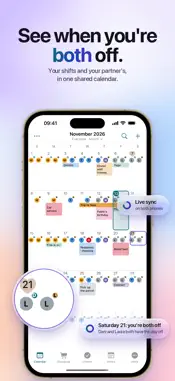
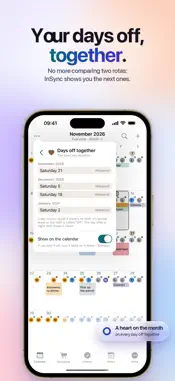
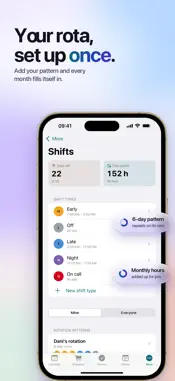
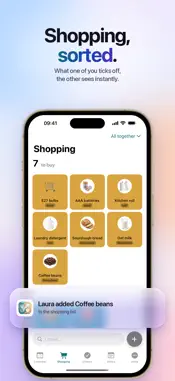
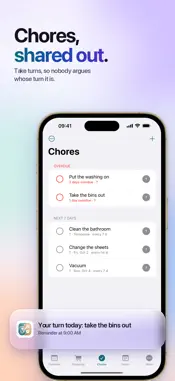
For couples who work shifts. Each of you adds your shifts once, and you both see in one calendar who’s working, who’s off and which days you’re both off: no more asking, no more photos of the schedule. And everything at home too: shared expenses, the shopping list, chores, notes and trips, always the same on both phones. WORK SHIFTS Set up your shifts with their colour and their shift pattern (rotating shifts included) and the calendar fills itself in. Changing a single day is one gesture, not a rebuild of the whole pattern. If you both work shifts, each of you has your own and you see them side by side. And on a double shift, two shifts fit on the same day. A GENUINELY SHARED CALENDAR Month, two-week, week and day views. What one of you creates shows up on the other’s phone in seconds, with nothing to refresh. And it keeps working with no signal: it syncs when you’re back online. SHARED EXPENSES Log what each of you pays, or what comes out of your joint account, and InSync tells you who owes whom: split in half or the way you choose. “Settle up” brings it back to zero, and recurring expenses like rent or electricity are added on their own every month. With InSync Pro, also: the month by category, previous months, a budget per category that warns you before you go over, and CSV export. YOUR OTHER CALENDARS, INSIDE Bring in the calendars you already have on your iPhone — iCloud, work, or the Google and Outlook ones you have set up in Settings — and see your usual events next to the group’s. One for free, up to five with InSync Pro. You decide which ones are shared and which stay yours. ORGANIZE A shopping list sorted by store, notes with checklists and household chores: assigned to one of you, taking turns or one-off, with or without a date. Tick things off from either phone, see who ticked what, and whatever your partner adds shows up straight away. TRIPS Plan the trip day by day: journeys, accommodation, itinerary and whatever attachments you need, in the same place as the rest of the calendar. WIDGETS AND SIRI Home Screen widgets: today and this week, free; the month, two weeks, four weeks and the shopping list, with InSync Pro. And you can ask Siri what you have on today without opening the app. NOTIFICATIONS Reminders for your events, and a notification when the other person adds or changes something. Events you import from other calendars never trigger notifications. PRIVACY Your data belongs to you and to the people you share the calendar with. No ads and no selling your data. We only count, anonymously, which parts of the app get used. You can delete your account from inside the app. INSYNC PRO The essentials are free: the shared calendar, the shifts, expenses and who owes whom, the shopping list, chores, the today and this-week widgets, and one trip, one note and one list. With InSync Pro: 5 external calendars, 100 trips, 500 notes and 500 lists, 500 MB for attachments, 10 shift styles, a reminder the day before each shift, expenses by category, previous months and budgets, and the month, two-week, four-week and shopping list widgets. It is a monthly or yearly subscription; the yearly one starts with a free trial, and you see how long it lasts before you subscribe. The subscription renews itself unless you cancel at least 24 hours before the period ends; you can manage or cancel it in your App Store account settings. No ads and no data selling on either plan. Terms of Use (EULA): https://www.apple.com/legal/internet-services/itunes/dev/stdeula/ Privacy Policy: https://idanidev-portfolio.vercel.app/insync/en/privacy.html
What's New
Version 1.1.4 2026-11-21
What's new: • Expenses: log what each of you pays and InSync tells you who owes whom, with categories and budgets. In the tab bar or in More. • Organize: chore...What's new: • Expenses: log what each of you pays and InSync tells you who owes whom, with categories and budgets. In the tab bar or in More. • Organize: chores now live inside Notes, and there are one-off chores, for one person and with or without a date. • In lists you can see who ticked each item, and what your partner adds shows up straight away. • Double shift: two shifts on the same day, from the day itself or on several days at once. • Create an event from a sentence: "Dinner with Ana on Friday at 9". • A reminder the evening before each shift, at the time you choose (Pro). • Leave with allowances: holidays and personal days show on the calendar and come out of their allowance. • More › Account › Download my data. • If you leave a group or are removed, you keep your shifts in "My calendar". • "Restore purchases" moves your Pro to the account you are signed in with. Calmer notifications: • Several plans or shifts added in a row arrive as a single notification. • From 10 pm to 8 am, and always for shopping and notes, they arrive silently. • A plan's reminder only rings for the person who created it. Fixes: • The app no longer closes if you leave it in the middle of a sync. • What you edit offline uploads without overwriting your partner's changes, and deleted items stay deleted. • Deleting a shift type no longer deletes the days that used it. • A new repeating chore starts today, not in a week's time. • Pinning a note from the overview now reaches your partner too. • In the Notifications bell in More you can skip the "To get started" steps you don't want. • In Day and Week views, things that cross midnight or last several days are placed correctly, and "today" moves on by itself at midnight. • When travelling, the calendar switches to local time without closing the app. • The "Automatic" theme follows the iPhone again. • "Days off together this month" no longer skips the first days of the month. • Signing in with another account on the same iPhone no longer mixes in the previous one's data. Technical Analysis
Package Overview Basic metadata
Bundle ID
com.idanidev.syncrocalendar.app Current Version 1.1.4
Minimum iOS 17.0
Package Size App Store Size
Package Metadata 0 / 0 version records
Detailed binary, privacy manifest, framework, and Info.plist results have not been indexed for this package yet. The verified App Store and archive metadata above remains available.
Developer Information
Known Version Records
0 version records with stored package metadata
Stored metadata does not guarantee a package is currently available to download.
| Details | Version / IDs | Version date | Action |
|---|