Preview


Description
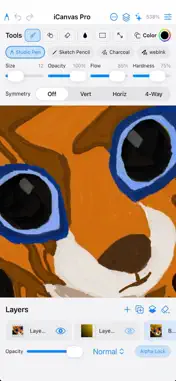
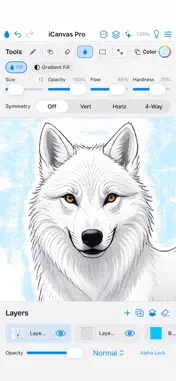
Create a great picture without confusion or clutter. iCanvas Pro is a simple, fast drawing app rebuilt from the ground up in native SwiftUI. Familiar tools, a clean workspace, and just enough power for sketches, icons, doodles, and finished art. DRAWING TOOLS • Studio Pen, Sketch Pencil, Charcoal, and webInk • Soft, Oil, Watercolor, Neon, Spray, Calligraphy, Hair, and Halftone brushes • Smudge, Eraser, Soft Eraser • Paint Bucket and Gradient Fill • Line, Rectangle, and Ellipse shapes • Color picker with brush size, opacity, and symmetry options LAYERS & SELECTION • Multiple layers with opacity, blend modes, and rename • Freehand, rectangle, and ellipse selection • Cut, copy, paste, and move selections • Multi-step Undo and Redo PROJECTS & CANVAS • Save and open .icanvas projects (layers preserved) • New canvas sizes and presets • Autosave so you don’t lose your work • Zoom, pan, and rotate canvas 180° • Light and Dark appearance PHOTOS & SHARE • Open images from Photos or take a photo with Camera • Export PNG (transparency) or JPG • Save to Photos and share AI ASSIST • Optional on-device Apple Intelligence styles. Made for people who want to draw — not dig through a complicated studio.
What's New
Version 2.0 2026-08-05
iCanvas Pro has been rebuilt as a native iPhone and iPad app. NEW • Full layer stack with opacity, blend modes, visibility, and rename • Save / Open .icanvas p...iCanvas Pro has been rebuilt as a native iPhone and iPad app. NEW • Full layer stack with opacity, blend modes, visibility, and rename • Save / Open .icanvas project files (keeps your layers) • New canvas size picker with presets • Expanded brush set: Studio Pen, Sketch Pencil, Charcoal, webInk, Soft, Oil, Watercolor, Neon, Spray, Calligraphy, Hair, Halftone • Smudge, Soft Eraser, Gradient Fill • Selection tools with cut, copy, paste, and move • AI Assist (on-device) • Dark Mode • In-app Feedback and Feature Request • Landscape side panels for tools and layers IMPROVED • Faster, smoother drawing engine • Reliable autosave • Clearer tool panels and brush controls • PNG / JPG export, Photos import, Camera, and Share Thank you for using iCanvas — we’d love your feedback from the lightbulb menu. Technical Analysis
Package Overview Basic metadata
Bundle ID
org.apache.iCanvas Current Version 2.0
Minimum iOS 17.0
Package Size App Store Size
Package Metadata 0 / 0 version records
Detailed binary, privacy manifest, framework, and Info.plist results have not been indexed for this package yet. The verified App Store and archive metadata above remains available.
Developer Information
Known Version Records
0 version records with stored package metadata
Stored metadata does not guarantee a package is currently available to download.
| Details | Version / IDs | Version date | Action |
|---|