
Preview



Description
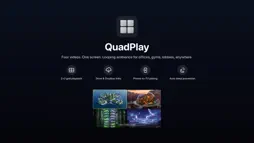
QuadPlay turns any Apple TV into a looping video wall for lobbies, gyms, storefronts, waiting rooms, or any screen that needs to run all day on its own. Paste up to eight video links from your phone and QuadPlay arranges them automatically: one screen fills the display, two sit side by side, four make the classic 2x2 grid, and eight arrange into two rows of four. Pair from your phone in seconds: scan the QR code on your TV, enter the security code, paste your links, and they start playing instantly. No account, no sign-in, nothing to install on your phone. Works with Google Drive and Dropbox share links, direct MP4/MOV files, live HLS (.m3u8) streams for cameras and event feeds, and Vimeo direct-file links on paid Vimeo plans. Save your setups as Scenes: name a wall from your phone, such as Lobby loop or Happy hour, and switch between saved scenes on the TV with one click. Every video streams instantly, then quietly caches locally in the background (up to 20GB on the Apple TV), so a dropped Wi-Fi connection never blacks out the screen. On networks that block phone-to-TV pairing, such as hotels, conference centers, and trade show floors, QuadPlay can pair through the cloud instead, so your phone works even on cellular data. QuadPlay Monthly is an auto-renewable subscription that starts with a 3-day free trial, then renews monthly until cancelled. Prefer to pay once? QuadPlay Lifetime is a single one-time purchase with nothing to renew. Terms of Use (EULA): https://www.apple.com/legal/internet-services/itunes/dev/stdeula/ Privacy Policy: https://quadplay.app/privacy-policy.html
What's New
Version 2.0 2026-09-14
What's new in 2.0: - Up to 8 videos at once, arranged automatically, not just 4 - Live streams: paste an HLS (.m3u8) link and it plays live - Scenes: save name... Technical Analysis
Package Overview Basic metadata
Bundle ID
com.foursplit.QuadPlay Current Version 2.0
Minimum iOS 17.0
Package Size App Store Size
Package Metadata 0 / 2 version records
Detailed binary, privacy manifest, framework, and Info.plist results have not been indexed for this package yet. The verified App Store and archive metadata above remains available.
Developer Information
Known Version Records
0 version records with stored package metadata • 2 known version records
Stored metadata does not guarantee a package is currently available to download.
| Details | Version / IDs | Version date | Action |
|---|---|---|---|
| Not archived | App Store ID: 885555797 | Unknown | Request Version |
| Not archived | App Store ID: 885344444 | Unknown | Request Version |