
Preview




Description
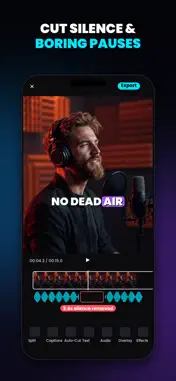
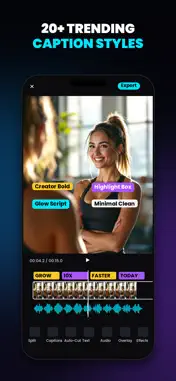
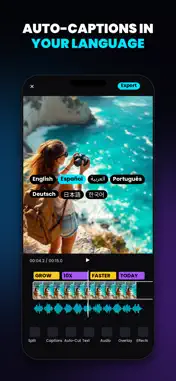
NEW: HandCut Pro Lifetime for just $9.99 — pay once, own it forever. No subscription required. Captions that land on the word — not near it. Handcut transcribes your video on your iPhone and times every caption to the word, so a pause reads as a pause and an emphasis lands where you put it. No upload. No render queue. No account. Nothing to sign up for. Built for people who talk to camera: coaches, course creators, realtors, podcasters, sellers cutting product video. If your video is you, saying something, this is the editor for it. WORD-BY-WORD CAPTIONS, DONE ON YOUR PHONE • Real per-word timing read from the audio, not guessed by dividing a sentence • Karaoke highlighting that follows the actual speech — the default look • On-device transcription — the app has no networking code to send audio with • Edit any word, restyle the whole set, move them anywhere on the frame PICTURE-IN-PICTURE, INCLUDED Screen recording plus a facecam bubble plus captions is the format this audience actually ships. It works on the free tier. Drag the bubble, pinch to size it, put it where it belongs. A REAL EDITOR UNDERNEATH • Multi-clip timeline with pinch-zoom, trim handles and drag-to-reorder • 18 film looks (11 free, 7 Pro) and 14 GPU transitions (4 free, 10 Pro) • 8 caption and text styles (3 free, 5 Pro) and Pro text animations (3) • Speed from 0.25× to 4×, with the trim preserved • Text, emoji and your own images — placed, scaled and rotated on the video • Mirror, crop and reframe for any aspect: vertical, square, widescreen • Frame rate follows your footage, up to 60fps • Music and voiceover tracks with a proper mixer • Manual keyframe animation — free on every plan WHAT COSTS NOTHING 1-Day Free Pass: unlimited captioned exports for 24 hours from your first one. Unlimited uncaptioned exports. Unlimited projects and length. 4K export, manual keyframes, picture-in-picture, on-device captions, most looks and transitions, text and stickers — and no watermark, on any tier. We do not brand your video. Resolution is not the paywall here. WHAT PRO ADDS Unlimited captioned exports, plus intelligence and automation — not resolution: transcript editing (delete words to cut video), motion tracking, Smart Cutout, Auto-Reframe, emphasis motion, basic denoise, Auto Match Look, version history, adjustment layers, plus the premium looks / transitions / caption styles / text animations. Green screen and extra video tracks stay free. Cutout, Reframe, Track, Denoise, Auto Match and Version History are Pro. WHY IT FEELS FAST The app makes no network requests, so there is no service to be down and no queue to wait in behind other people's videos. Your footage, your captions and your export all happen on the silicon in your hand. That is also why it is private — but the point is that it is quick. Handcut asks for no account, collects no analytics, and shows no ads. Handcut Pro subscriptions auto-renew unless auto-renew is turned off at least 24 hours before the end of the current period. Payment is charged to your Apple Account at confirmation of purchase. The lifetime option is a one-time purchase, not a subscription. Manage or cancel anytime in your Apple Account settings. Terms of Use: https://shuhratjon1010.github.io/handcut/terms.html Privacy Policy: https://shuhratjon1010.github.io/handcut/privacy.html
What's New
Version 4.2 2026-10-28
• 1-Day Free Pass: unlimited captioned exports for 24 hours from your first one. After that, Pro Lifetime is a one-time payment. • NEW: HandCut Pro Lifetime for... Technical Analysis
Package Overview Basic metadata
Bundle ID
app.replit.luminavideoeditor Current Version 4.2
Minimum iOS 17.0
Package Size App Store Size
Package Metadata 1 / 3 version records
Detailed binary, privacy manifest, framework, and Info.plist results have not been indexed for this package yet. The verified App Store and archive metadata above remains available.
Developer Information
Known Version Records
1 version record with stored package metadata • 3 known version records
Stored metadata does not guarantee a package is currently available to download.
| Details | Version / IDs | Version date | Action |
|---|---|---|---|
| 11.5 MB | v3.1.13 App Store ID: 885203148Build: 3.1.13 | 2026-10-05 18:41:19 | Get Version |
| Not archived | App Store ID: 884963624 | Unknown | Request Version |
| Not archived | App Store ID: 884409183 | Unknown | Request Version |