Preview






Description
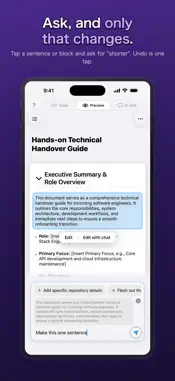
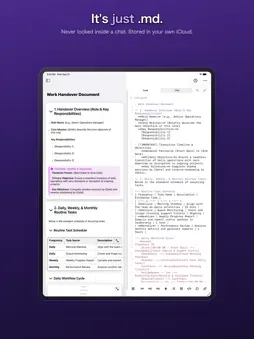
You think things through with AI. The thinking never becomes a document. KakiDoc is built to close that gap. A GOOD CONVERSATION, AND NOTHING TO SHOW FOR IT You talked it through. It got clearer. But the conversation only scrolls away — hard to read back, harder to hand to anyone. Copy it out, redo the headings, reorder the parts... and that is usually where it stops. WHEN IT'S READY, ONE BUTTON A new document opens as a chat-only screen. Throw in whatever you have, bullet fragments are fine. The AI fills the gaps with suggestions, and asks with options when it needs a decision. When the shape is right, press Turn into a document. You get a few ways it could be structured. Swipe through them and read exactly what each one would write. Pick one, press Create the document, and that is the moment it is created. AN AI THAT DOESN'T WRITE UNTIL YOU SAY SO If the list looks wrong, go back and keep talking. Nothing is written behind your back. Thinking and drafting are separate here, so you never get a finished piece handed to you while you are still working out what you mean. THEN REVISE, ONE SENTENCE AT A TIME Once the document exists, tap the sentence or block you want to change and ask: "shorten this", "make it more formal". Undo is one tap, and around 100 versions of history are kept. A PREVIEW WORTH READING Tables, code blocks, Mermaid diagrams, maths, callouts, images and video are all rendered as you write. WHAT YOU WRITE STAYS YOURS Nothing is locked inside a chat. Documents are stored in your own iCloud (CloudKit). The developer cannot access them. The format is plain Markdown, so other apps can open it. Export to Markdown, HTML, PDF or PNG, or send everything including images as a transfer pack (.mdpack). PRICING Creating, editing, previewing, iCloud sync and export are free, with no sign-in. AI features (chat, AI editing, web research) need an Apple Account sign-in and come with a free allowance to try. That allowance is one-time and does not reset monthly. A subscription is required to keep using AI. REQUIREMENTS iPhone and iPad. All AI processing runs in the cloud (Google Gemini). Terms of Use (EULA): https://www.apple.com/legal/internet-services/itunes/dev/stdeula/ Privacy Policy: https://kakidoc.com/privacy
What's New
Version 1.2 2026-09-23
• A clearer path from idea to document New documents now open as a chat screen so you can think out loud with the AI first. When you're ready, Turn into a d...• A clearer path from idea to document New documents now open as a chat screen so you can think out loud with the AI first. When you're ready, Turn into a document shows you exactly what will be written before anything is created — so the document never changes under you. • Choose how it gets structured Turn into a document now offers a few structures. Swipe through them, see what each one would write, and run only the one you want. • One question at a time When several things need deciding, they no longer pile up at once. Answer one and the next takes its place, so the chat stays readable. • Rebuilt first-run walkthrough See how the app works as a diagram, then try the whole flow yourself. • Fixes A reply that had already arrived could end with a "busy right now" message. The AI could answer in Japanese when the app was set to English. Technical Analysis
Package Overview Basic metadata
Bundle ID
com.tagmindmap.ai-markdown-editor Current Version 1.2
Minimum iOS 18.0
Package Size App Store Size
Package Metadata 0 / 0 version records
Detailed binary, privacy manifest, framework, and Info.plist results have not been indexed for this package yet. The verified App Store and archive metadata above remains available.
Developer Information
Known Version Records
0 version records with stored package metadata
Stored metadata does not guarantee a package is currently available to download.
| Details | Version / IDs | Version date | Action |
|---|