Preview









Description
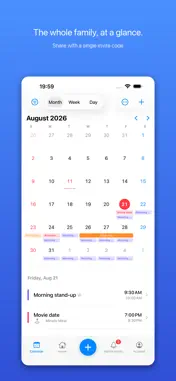
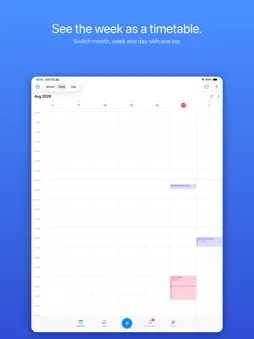
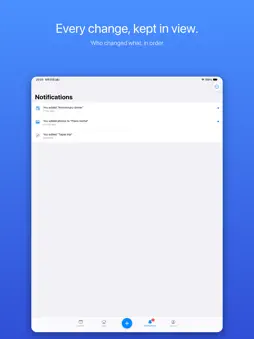
Timo is a calendar for sharing your days with the people who matter. No email exchange. No account to create. Send an invite code or a link, and you're sharing. ■ Share with just an invite code Make a calendar for each part of your life — Family, Us two, Work — and invite people with an 8-character code or a link. From the moment they join, your events stay in sync on both devices. Changes you make offline arrive as soon as you're back online. ■ Your own devices, already together An iPhone and an iPad on the same Apple Account show the same plans the moment you open them. Nothing to set up, no account to create, no code to type. For a device on a different Apple Account, you can sign in with your email address instead. ■ Everything an event needs Title, date and time, all-day, location, notes, URL, participants and color. Reminders range from presets like "10 minutes before" and "the day before" to any date and time you choose. Events can repeat daily, weekly (on several weekdays), monthly or yearly, and when you change or delete one you can choose whether it applies to this event only, this and all future events, or all of them. ■ Month, week, day — and Home Switch between the whole month, the week's timetable and a single day's timeline with one tap. The Home screen gathers today's events, what's next, and the events you've pinned. Swipe right to complete, left to delete. Holidays are shown in color. ■ Travel gets its own dashboard Flight number, boarding time, seat and gate, hotels, a day-by-day timeline, a packing checklist, expenses, tickets (images and PDFs), local weather and currency, and emergency numbers. The countdown to departure appears on your Lock Screen, and when there's a time difference, local time and Japan time sit side by side. ■ Find what you're looking for Search by title, place, notes, participants, calendar name or destination. Combine filters like Today, This week, Trips and Has photos. ■ Photos and videos, kept with the day Attach photos and videos to an event. Tap the day and the time you spent comes back in order. ―――――――――――――――― 【Timo Premium】¥300/month or ¥3,000/year ■ Family plan Up to 4 people including you. Everyone you invite gets the Premium features. ■ Advanced location sharing Automatic alerts like "Arrived at the hotel" and "Left the airport", a heads-up when you're nearby, location sharing for a set time, and scheduled starts. Every decision is made on your device, and no location history is kept. ■ Design themes Twenty themes in all. Five of them — Standard, Mono, Sky, Mint and Apricot — are free. The other fifteen are part of Premium. The palette and the cards change the feel of the whole app. ■ Smart notifications "Time to head out." "Rain is forecast today." Notifications that fit your events, the weather and your trip — all worked out on your device. ■ Premium widgets Glass, Photo, Travel and Dark widgets for the Home Screen, plus Lock Screen widgets. Today's events, what's next, and the countdown to your trip at a glance. ―――――――――――――――― ■ About privacy Events in a shared calendar are visible only to the people in it. Photos and profile pictures are stored on your device. There are no ads and no tracking. —— Simple, beautiful, and never in your way. Timo quietly keeps up with you and the people you share your days with. ―――――――――――――――― ■ About Timo Premium (auto-renewable subscription) · Monthly plan: ¥300 for 1 month · Yearly plan: ¥3,000 for 1 year Payment is charged to your Apple ID at confirmation of purchase. The subscription renews automatically at the same price unless canceled at least 24 hours before the end of the period. You can cancel anytime in your App Store account settings. Terms of Use (EULA) https://www.apple.com/legal/internet-services/itunes/dev/stdeula/ Privacy Policy https://1984agentoffice-eng.github.io/timo-legal/privacy.html
What's New
Version 1.8 2026-09-08
• Press and hold a date to open a sheet with "New event" and the events you have created before. Tap one to create the same event on that day. Pull the sheet up...• Press and hold a date to open a sheet with "New event" and the events you have created before. Tap one to create the same event on that day. Pull the sheet up to read the whole list full screen. • The photo you set on a calendar now also appears in the calendar list, the event editor and the chips above the month, so you can tell calendars apart at a glance. • New chips above the month let you show and hide each calendar on its own, so you can keep several visible and pick only the ones you want. • Event and label colours went from 10 to 30, grouped into vivid, pale and muted. The original 10 are still in exactly the same places. • You can now choose how the calendar behaves: "Month only" opens the day's event list when you tap a date, while "Month, week and day" keeps the timeline views. • Labels and events are told apart by icons rather than plain colour dots. • Invite codes are created when you actually share a calendar, and you can now turn one off or replace it. People who already joined stay in. Technical Analysis
Package Overview Basic metadata
Bundle ID
com.timo.calendar Current Version 1.8
Minimum iOS 18.0
Package Size App Store Size
Package Metadata 0 / 0 version records
Detailed binary, privacy manifest, framework, and Info.plist results have not been indexed for this package yet. The verified App Store and archive metadata above remains available.
Known Version Records
0 version records with stored package metadata
Stored metadata does not guarantee a package is currently available to download.
| Details | Version / IDs | Version date | Action |
|---|