Preview





Description
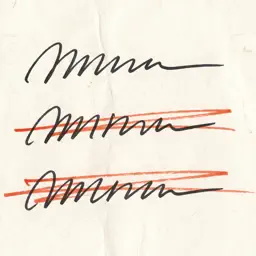
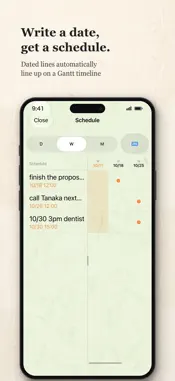
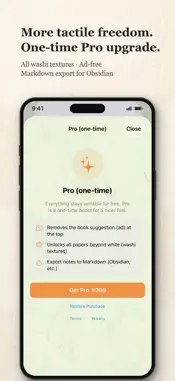
Uragami Memo is a minimal notepad you just scribble on. The front is a single sheet of scrap paper — but behind it, everything you write quietly becomes organized data. [Just write, then hit return] Jot things down without thinking. Each line becomes one note. No need to tidy up — this is paper for writing roughly and often. It works just as well as a plain notepad or a to-do list. [Archive, don't delete] Swipe a note you no longer need into the Archive. It leaves the page, but the text, date, and tags all remain. The Archive is folded by time and fully searchable, so "when did I write that shopping note?" is answered instantly. [Write a date, get a schedule] "by tomorrow", "10/24 3pm", "next Monday" — write a date in a note and that line lines up on an auto schedule (Gantt). A calendar mark appears in the top bar only when you have live plans. You can also add a plan to your device calendar. [On your device, across your devices] Notes are stored on your device and synced across iPhone, iPad, and Mac via iCloud. Your notes are never sent to an external server. Classification runs entirely on-device. [Widgets, Lock Screen, Siri] Show recent notes in Home Screen and Lock Screen widgets. On Home Screen widgets, the check mark on each line archives it without opening the app. Say "Hey Siri, add a note to Uragami Memo" to add a line by voice. [Export and take it with you] Your notes are yours. Export to Markdown and take them anywhere — Obsidian, or plain text (Pro). [Pro (one-time ¥300)] - Removes the book suggestion (ad) at the top - Unlocks all papers beyond white (washi textures) - Enables Markdown export Writing, archiving, the schedule, search, widgets, and Siri are all free. Simple on the front, solid on the back. A piece of scrap paper that quietly holds your days.
What's New
Version 1.3 2026-11-08
We greatly improved the writing feel. The keyboard no longer moves around while you write. - The keyboard stays put when you press Return to commit a line, so ...We greatly improved the writing feel. The keyboard no longer moves around while you write. - The keyboard stays put when you press Return to commit a line, so you can keep writing without interruption. - We added a dismiss button (a down arrow) above the keyboard. It never hides on its own and closes only when you tap it; tap anywhere to bring it back. As before, your notes sync only within your own device and your own iCloud. Please give it a try. Technical Analysis
Package Overview Basic metadata
Bundle ID
com.daisakuseto.uragamimemo Current Version 1.3
Minimum iOS 17.0
Package Size App Store Size
Package Metadata 0 / 0 version records
Detailed binary, privacy manifest, framework, and Info.plist results have not been indexed for this package yet. The verified App Store and archive metadata above remains available.
Developer Information
Known Version Records
0 version records with stored package metadata
Stored metadata does not guarantee a package is currently available to download.
| Details | Version / IDs | Version date | Action |
|---|