
Preview







Description
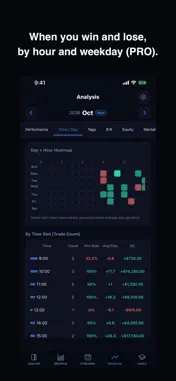
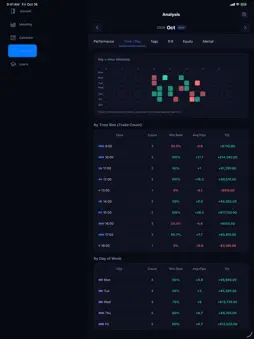
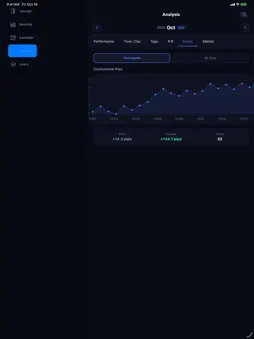
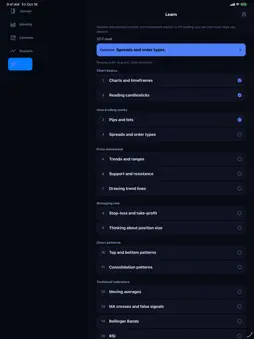
FX Trade Journal is a forex trading journal for iPhone and iPad. Enter your entry and exit prices, and pips, P/L, win rate and profit factor are tallied automatically. Review your trades on a calendar and in monthly reports, and turn your stats into a shareable card. Import your history from MT4/MT5 reports (HTML) or CSV files. No account needed: your journal stays on your device in an encrypted database. ■ Log ・Log a trade in three taps with quick entry: currency pair, entry price, lot size, P/L, and pips ・Attach chart screenshots to any trade ・Add notes and tags for easy review later ・Bulk-import your MT4/MT5 trade history report (HTML) or CSV ■ Analyze ・Monthly dashboard auto-calculates win rate, pips, profit factor, and P/L ・Breakdowns by currency pair and trading style ・Daily streak tracking to keep your recording habit alive ・33 achievement badges and a position size calculator, free for everyone ■ Learn (English and Japanese; not in all regions) ・Short lessons with diagrams on reading charts: candlesticks, trends, support and resistance, stop-loss, moving averages, RSI, MACD and chart patterns ・Turn a step from a lesson into your own trade rule ・General educational content, not investment advice or a buy/sell recommendation. Diagrams use fictional prices ■ Share ・Turn your monthly results into a clean, shareable stats card (X, Instagram, and more) ・PRO removes the watermark for a fully clean design ■ Home Screen widgets ・See today, this week and this month together ・A progress ring shows how close you are to the goals you set ・The small and Lock Screen widgets let you pick the period ・Tap any widget to jump straight to the trade entry screen ■ Who it's for ・Traders just starting out who want to build a recording habit ・MT4/MT5 users tired of manual spreadsheet tracking ・Anyone who wants a monthly view of their win rate and pips ・Traders who like sharing their results on social media ・Anyone who wants a trading journal that lives entirely on their phone ■ FX Trade Journal PRO A monthly or annual subscription unlocks the PRO tier: ・All analysis tabs: time of day and weekday, tags, risk-reward and equity curve ・Weekly view, monthly insights and the yearly tab ・Weekly recap of your own records ・Daily, weekly and yearly goals with calendar achievement marks ・Up to 3 chart images per trade ・Mental-state tracking and multi-timeframe notes ・Watermark-free share cards Pricing is shown on the purchase confirmation screen. Cancel anytime in your device's Settings app. Subscriptions renew automatically. Both the monthly and annual plans include a 7-day free trial (one trial per person, on either plan). ■ About your data ・Trades, charts and settings stay on your device ・No cloud sync. Logging and analysis work offline (the app connects only to purchase or restore PRO, check for updates and send crash and usage reports with a random device ID; your trade records are never sent) ・Biometric app lock and an encrypted on-device database ■ Supported brokers / platforms Any MT4/MT5 broker works: save your history as a report (HTML) in the desktop app, or use an MT4/MT5-format trade history CSV. Manual entry is fully supported too, for any broker or platform. ■ Feedback & Support Reach us anytime via Settings → Contact Us in the app. We'd love to hear what features you want next. Note: P/L is tracked in your account currency (choose from 15 currencies in Settings, e.g. USD, EUR, JPY). For pairs quoted in your account currency (the right-hand side of the pair), P/L is calculated automatically from pips and lot size. Other pairs (e.g. USD/JPY on a USD account) can't be calculated automatically: enter the P/L from your broker's trade history to include them in monthly, calendar and analysis totals. If you leave it blank, that trade's P/L is not counted. MT4/MT5 imports warn you when the file's account currency differs from the app's. Terms of Use: https://kainan0880jwr.github.io/fx-trade-journal/terms-en.html
What's New
Version 1.3.9 2026-11-04
• Save a trade as open and add the exit later ("Save as open"). Open trades are listed at the top of the Journal tab and don't count in your stats until you add... Technical Analysis
Package Overview Basic metadata
Bundle ID
com.fxtradejournal.ios Current Version 1.3.9
Minimum iOS 15.1
Package Size App Store Size
Package Metadata 0 / 0 version records
Detailed binary, privacy manifest, framework, and Info.plist results have not been indexed for this package yet. The verified App Store and archive metadata above remains available.
Developer Information
Known Version Records
0 version records with stored package metadata
Stored metadata does not guarantee a package is currently available to download.
| Details | Version / IDs | Version date | Action |
|---|