Preview


Description
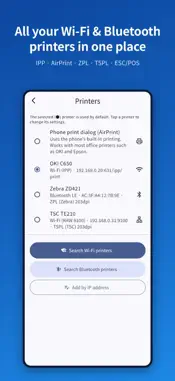
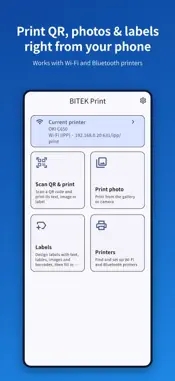
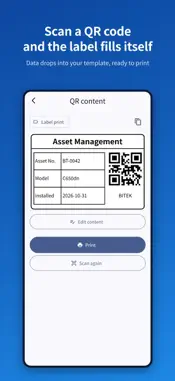
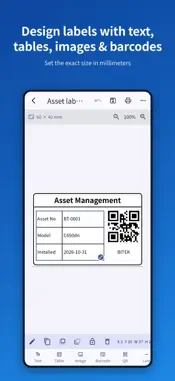
BITEK Print lets you print QR codes, photos and labels from your iPhone or iPad to Wi-Fi and Bluetooth printers. Whether you need to tag equipment, print a photo or put the contents of a QR code on paper, you can do it on the spot without a PC. ■ Scan a QR code and print • The app recognizes what is inside a QR code and prints it automatically. • Supports text, web links, image and PDF links, Wi-Fi details and contacts (vCard). • Scan a label QR code and its values drop straight into your saved label template. • Read QR codes from photos, or type the content yourself. ■ Print photos • Print photos from your photo library or camera on A4, 4×6, L-size or label-sized paper. • Choose fit or fill. ■ Design labels • Set the label size in millimeters. • Add text, tables, images, barcodes, QR codes, lines and boxes, then move and resize them freely. • Barcodes: Code 128, Code 39, EAN-13, EAN-8, UPC-A, ITF, Codabar, Data Matrix, PDF417 • Keep the design and change only the content on the quick fill-in screen. • Fill a whole A4 label sheet with the same label. ■ Printers • Automatically finds printers on the same Wi-Fi network and shows whether each one can print. • Office network printers (IPP): sends PDF/JPEG directly, for example to the OKI C650dn • AirPrint printers • Label and receipt printer languages: ZPL, TSPL, ESC/POS • Finds and prints to Bluetooth LE label printers • Save or share the output as a PDF ■ Why it is handy • What you see is what prints, so Korean, Japanese and Chinese text never turns into broken characters. • No sign-up or login. • Label templates and printer settings stay on your device, and print data goes only to the printer you choose. • Available in English, 한국어, 日本語, 简体中文 and 繁體中文 Some features may work differently depending on the printer model and its settings. Contact: [email protected]
What's New
Version 1.2 2026-11-05
• New "Send to PC": send QR contents, photos and label values from your phone to the BITEK Print PC program, which prints them on your PC's printers. Works from... Technical Analysis
Package Overview Basic metadata
Bundle ID
com.bitekps.mobileprint Current Version 1.2
Minimum iOS 15.0
Package Size App Store Size
Package Metadata 0 / 0 version records
Detailed binary, privacy manifest, framework, and Info.plist results have not been indexed for this package yet. The verified App Store and archive metadata above remains available.
Known Version Records
0 version records with stored package metadata
Stored metadata does not guarantee a package is currently available to download.
| Details | Version / IDs | Version date | Action |
|---|