
Preview




Description
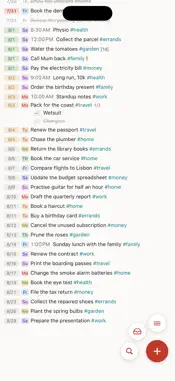
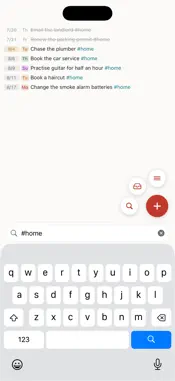
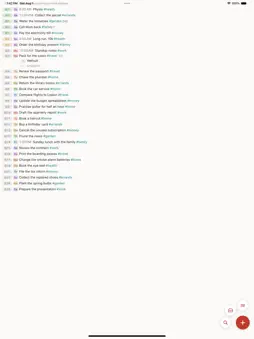
Open Underway and you land on today. Type one plain line and it becomes a dated entry. Scroll back a month and it is all still there, ticked off, on the day you did it. The days behind you sit just above, the days ahead just below, and you scroll straight through them, back through last year or forward into next. If you have ever dated a page in a paper notebook and written one line per thing, this is that, typed. Write "lunch with Sam friday 2pm #work" and Underway pulls out the date, the time and the tag on its own. Type ! or !! to mark a line important. No forms, no fields, no five taps to write down one thing. A line can be a trip, a day off, a bill, an appointment, a birthday, or where someone else in the family is that afternoon. A calendar wants a start time and an end time. A to do list wants a checkbox. A lot of life is neither, and all of it can go in here and still be findable months later. Finished tasks do not vanish. They stay on the day you did them, quietly greyed, so scrolling back through last month shows you what you actually got done. Your plan for the year and your record of it are the same thing. There is nothing to set up. No projects, no lists to build first. You open it and start typing. WHAT IS IN IT • Dates and days of the week are tinted, so a glance tells you where you are. • A switch to hide finished lines, if you would rather see only what is left. • Overdue in one move. A banner counts what slipped and offers to bring it all to today, or clear it. • Tags and priorities you type, not pick from a menu. # for a tag, ! for important. • Search across everything, still fast at tens of thousands of entries, and a calendar view to jump to any date. • Vault, for anything that has no date yet, with an optional nudge to look through it. • Repeats. Daily, weekly, monthly or yearly, ending on a date or after a count. Change one, or change this one and every one after it. • Optional reminders on anything with a time, and birthdays brought in from Contacts once so they come back every year. • Widgets on your Home Screen and Lock Screen. Tap one to land on the task. • Apple Watch. Today, overdue and the week ahead on your wrist. Tick things off, or dictate a new line and it arrives on your phone. • A look back, if you want one. How often you finish on time, what you added and completed, and how long your streak is. • Themes, palettes and paper textures. • Backups you keep. Take out a full copy, or a lightweight one you can read in any text editor, and import it back whenever you like. NO ACCOUNT, NO SERVER No sign in. No ads. No trackers. Your tasks are not sent to us, and there is nowhere for us to send them. Everything lives on your iPhone, your watch talks straight to your phone, and you can take a copy out whenever you want. Free, with nothing to buy inside. Available in English, Spanish, French, German, Japanese, and Simplified Chinese.
Technical Analysis
Package Overview Basic metadata
Bundle ID
com.cylandea.Divine Current Version 1.0
Minimum iOS 18.0
Package Size App Store Size
Package Metadata 0 / 0 version records
Detailed binary, privacy manifest, framework, and Info.plist results have not been indexed for this package yet. The verified App Store and archive metadata above remains available.
Known Version Records
0 version records with stored package metadata
Stored metadata does not guarantee a package is currently available to download.
| Details | Version / IDs | Version date | Action |
|---|