
Preview




Description
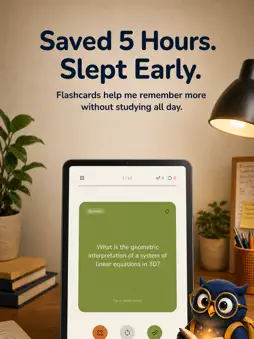
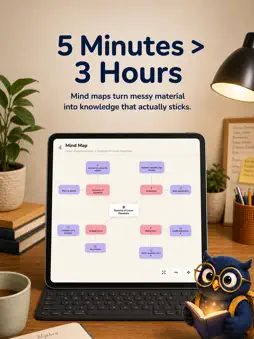
Studying should not start with rewriting everything by hand. Lernix AI helps you turn the study materials you already use into review-ready outputs. Upload a PDF, record a lecture, paste a YouTube link, add notes, or scan an image, and Lernix organizes everything into summaries, visual notes, mind maps, flashcards, quizzes, and interactive AI chat. Keep your study materials flexible as you learn: translate study content whenever you need it, and edit notes or generated materials at any time. USE THE MATERIALS YOU ALREADY STUDY FROM Whether you learn from class recordings, textbook pages, lecture slides, screenshots, notes, or YouTube lessons, Lernix gives you one place to capture, organize, and review them. TURN INPUT INTO OUTPUT FAST Instead of switching between note-taking, summarizing, flashcard tools, mind map tools, and quiz apps, use one study flow: - Upload PDFs and documents - Record lecture audio - Paste YouTube links - Capture text, slides, and images - Add custom notes Then turn them into: - Structured notes and summaries - Visual note images that make key ideas easier to remember - Visual mind maps to understand how ideas connect - Flashcards for repeated review - Quizzes to check understanding - Interactive Q&A with your own materials - Practice sessions from your real study content CHAT WITH YOUR STUDY MATERIALS Ask questions about your PDFs, lecture recordings, notes, images, and YouTube lessons. Lernix can help explain difficult concepts, summarize specific parts, and turn your own materials into active review. BUILT FOR REAL STUDY WORKFLOWS Lernix is designed for students who want to spend less time organizing content and more time actually reviewing it. Use it to: - review lecture recordings after class - study faster from PDFs and textbook pages - turn YouTube learning into study guides - create mind maps from complex topics - keep notes, flashcards, quizzes, and chats connected - practice key ideas without building everything manually WHY LEARNERS USE LERNIX - One place for capture and review - Faster study setup from real materials - Clear notes from complex content - Visual note images for remembering key ideas - Mind maps that show how concepts connect - Flashcards and quizzes without manual formatting - AI chat for asking follow-up questions - A smoother flow from input to repetition LESS ORGANIZING. MORE REVIEW. If your study process starts with too much sorting, rewriting, and copying, Lernix AI helps you move faster. Capture what you are learning, turn it into review-ready material, and keep your study flow moving. Built for iPhone and iPad on iOS 16.4 or later. Capture a lecture with multilingual speech-to-text, scan or photo a page, or type text. Lernix turns it into structured notes, summaries, spaced-repetition flashcards, quizzes, zoomable mind maps you can export as an image, and Visual Notes — a 16:9 infographic of 3–6 key points. Chat with your notes, edit them, and use the built-in translator across 33 languages. A practical homework helper and exam planner without jumping between apps. Selected icons used in this app are provided by Icons8. Terms of Use: https://lernixai.com/terms/ios/ Privacy Policy: https://lernixai.com/privacy/ios/
What's New
Version 2.3.5 2026-10-28
- Faster photo uploads - Smoother image generation in chat - Small refinements to the upgrade screen Technical Analysis
Package Overview Basic metadata
Bundle ID
com.currentorbit.lernixai Current Version 2.3.5
Minimum iOS 16.4
Package Size App Store Size
Package Metadata 0 / 8 version records
Detailed binary, privacy manifest, framework, and Info.plist results have not been indexed for this package yet. The verified App Store and archive metadata above remains available.
Developer Information
Known Version Records
0 version records with stored package metadata • 8 known version records
Stored metadata does not guarantee a package is currently available to download.
| Details | Version / IDs | Version date | Action |
|---|---|---|---|
| Not archived | App Store ID: 886995177 | Unknown | Request Version |
| Not archived | App Store ID: 886016472 | Unknown | Request Version |
| Not archived | App Store ID: 885912370 | Unknown | Request Version |
| Not archived | App Store ID: 885559743 | Unknown | Request Version |
| Not archived | App Store ID: 885486770 | Unknown | Request Version |
| Not archived | App Store ID: 884883684 | Unknown | Request Version |
| Not archived | App Store ID: 884642787 | Unknown | Request Version |
| Not archived | App Store ID: 884061436 | Unknown | Request Version |