
Preview



Description
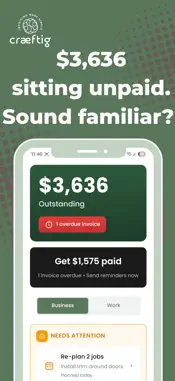
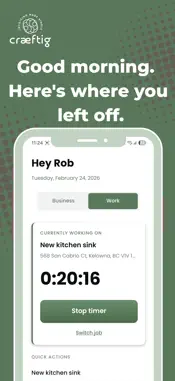
You're running a real business — quoting jobs, managing crews, tracking materials, chasing payments. But the tools? A spreadsheet you've outgrown, an accounting app you don't love, and a phone full of receipt photos you'll "organize later." You don't need more software. You need one app that handles the stuff between finishing the job and getting paid. Craeftig was built with contractors — plumbers, electricians, people in the trades. Whether it's just you or a small crew, you don't have time to figure out complicated software. We asked them what they actually needed. Not what looked good in a demo. What they'd actually use on a Tuesday night after a full day on site. Job Sheets: One screen for everything on a job. Time, materials, receipts, progress, profitability. Plan your week with arrival windows and crew assignments. See what's on today — morning, afternoon, evening. When things shift, put a job on hold and get a reminder to re-plan. Pick addresses on the map and your home screen shows nearby jobs so you know what's next. Receipts: Snap a photo or upload a PDF — multi-page ones too. The app reads the receipt and picks up the tax for you to review. Every receipt ties to a job, so when tax season hits you're not digging through a glove box. Need one from three weeks ago? Search and find it in seconds. Time Tracking: Log hours and breaks against a job. Timesheet or clock in and out — your call. Track time per crew member so the hours are accounted for, not estimated. Turn on Collect payroll hours and each crew member gets their own Payroll tab — their week laid out in tiles, gaps flagged, nothing missed. You review and sign off the week, or let them submit straight to your accountant. Two modes, your choice. Invoicing: Build a professional invoice and send it in minutes. Email or text — one tap. See who's paid and who's dragging their feet. Get notified when a client opens your invoice. Put your logo on it so it looks like you. GST/HST is handled based on your province. The app checks if you've got a timer still running so you don't leave money on the table. When it's time for your accountant, export everything as a CSV in one tap or Connect QuickBooks and sync any invoice with one tap — you choose which ones and when. No automatic sync, no duplicates. Your accountant sees it in QBO exactly as you created it, GST/HST and all. Crew: They sign in with Face ID, fingerprint, or a code — no passwords. Send a link, they're set up. They only see the jobs they're assigned to — your invoices, pricing, and financials stay private. Getting In: Face ID or fingerprint. No passwords to remember. Built for plumbers, electricians, carpenters, handymen, general contractors, HVAC technicians, roofers, painters, decorators, and drywallers. Craeftig isn't trying to be everything. No 47 features you'll never open. No learning curve that takes a weekend. Just the stuff that matters for a small contracting business — jobs, time, receipts, invoices — in your pocket and ready to go. Try it free. If it saves you even one night of catching up on paperwork, it paid for itself. Need help? We're real people and we actually respond: [email protected] www.craeftigapp.com Terms of Service: https://join.craeftigapp.com/terms.html Privacy Policy: https://join.craeftigapp.com/privacy.html
What's New
Version 2.1.2 2026-05-05
CREW TIMESHEETS Track your crew's hours properly — without a separate app. Enable Collect payroll hours in Company Settings and each crew member gets a Payroll ...CREW TIMESHEETS Track your crew's hours properly — without a separate app. Enable Collect payroll hours in Company Settings and each crew member gets a Payroll tab showing their week at a glance. Set work schedules per crew member. The app flags short days, empty days, and gaps — so you're not guessing who worked what on Friday night. Two modes: Owner Mode lets you review and sign off the week yourself before it goes anywhere. Trust Mode lets your crew submit their own timesheets straight to your accountant with you CC'd. Crew members can flag days for review if something doesn't look right. You dismiss the flag once it's sorted. No back-and-forth. QUICKBOOKS ONLINE — CONNECTED Connect your QuickBooks account from Company Settings. Sync any invoice to QBO with one tap from the kebab menu on the invoice card. You choose which invoices to sync and when. No automatic sync. No duplicates. Green icon on the card means it landed. Amber means something went wrong — tap to retry. Tap the QBO link on the invoice detail screen to open it directly in QuickBooks. Your accountant sees the invoice in QBO exactly as you created it — GST/HST, line items, customer name. One app. One tap. Done. Technical Analysis
Package Overview Basic metadata
Bundle ID
com.craeftig Current Version 2.1.2
Minimum iOS 15.1
Package Size App Store Size
Package Metadata 0 / 11 version records
Detailed binary, privacy manifest, framework, and Info.plist results have not been indexed for this package yet. The verified App Store and archive metadata above remains available.
Developer Information
Known Version Records
0 version records with stored package metadata • 11 known version records
Stored metadata does not guarantee a package is currently available to download.
| Details | Version / IDs | Version date | Action |
|---|---|---|---|
| Not archived | App Store ID: 885259110 | Unknown | Paid / Arcade |
| Not archived | App Store ID: 883593743 | Unknown | Paid / Arcade |
| Not archived | App Store ID: 882952168 | Unknown | Paid / Arcade |
| Not archived | App Store ID: 882553947 | Unknown | Paid / Arcade |
| Not archived | App Store ID: 879782619 | Unknown | Paid / Arcade |
| Not archived | App Store ID: 876424723 | Unknown | Paid / Arcade |
| Not archived | App Store ID: 873376490 | Unknown | Paid / Arcade |
| Not archived | App Store ID: 872296756 | Unknown | Paid / Arcade |
| Not archived | App Store ID: 872115098 | Unknown | Paid / Arcade |
| Not archived | App Store ID: 871623443 | Unknown | Paid / Arcade |
| Not archived | App Store ID: 865635881 | Unknown | Paid / Arcade |