
Preview




Description
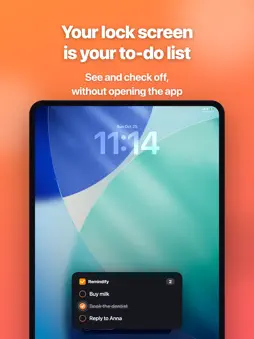
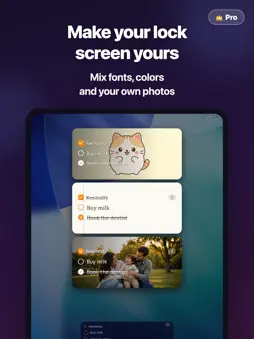
Manage your to-dos without unlocking your iPhone. Remindify shows your reminders and to-do list right on your Lock Screen as a Live Activity. Tap to check items off—no Face ID, no unlocking, no app launch. From grocery lists to daily habits, your tasks are always one glance away. ■ Who is it for? • People who forget shopping lists, to-dos, and reminders • Anyone who finds it tedious to open a task manager app every time • Users who want a simpler alternative to the stock Reminders app • iPhone users who want their schedule and notes on the Lock Screen • Power users who want to add memos quickly via the Action Button or Siri ■ Features ◎ Always on your Lock Screen Live Activity shows your top reminders and to-dos as a persistent banner. Check them anytime—no unlocking required. ◎ One-tap complete Tap the checkbox right on your Lock Screen to mark tasks done. Face ID unlock not needed. ◎ Add from anywhere • Action Button (iPhone 15 Pro & later) for instant capture • "Hey Siri, add a reminder to Remindify" for voice input • Spotlight Search quick access • Share Sheet from Safari, Notes, and other apps to save URLs and text ◎ Reminders-app-style inline editing Tap any row to edit in place. Hit Return to add the next item—fluid, frictionless to-do entry. ◎ 24-hour completed view Completed tasks stay visible in gray for 24 hours so you can see your wins, then auto-hide for a clean list. ◎ Lock Screen widgets Alongside Live Activity, Lock Screen widgets are supported in multiple sizes. ■ Use cases • Shopping lists, grocery memos • Travel packing checklists • Project task lists • Daily habit reminders • Quick brain-dump memos ■ Requirements • iOS 18.0 or later • iPhone, iPad, and Apple Watch • Supports Lock Screen widgets, Live Activity, and Dynamic Island If you want a lightweight reminders app that stays in front of you on the Lock Screen, Remindify is for you. ◎ Make it yours Backgrounds (colors, gradients, paper, photos), fonts, and check shapes—style your Lock Screen, widgets, and the app itself. ◎ Attach photos & links Long-press any task to attach a photo or a link. ■ Remindify Pro These features are available with Remindify Pro (monthly/yearly subscription, or a one-time lifetime purchase): • Task-count reactive design: the Lock Screen design and Dynamic Island icon change automatically with your remaining tasks • Custom Dynamic Island icon: keep your favorite photo in the Dynamic Island • App icon in 12 colors • Repeating tasks (daily or weekly): completed tasks automatically come back on schedule • Cloud sync for attached photos: keep them across devices and when you switch phones • Apple Watch app, plus Smart Stack and complications • Web version: view and edit your tasks from your computer's browser (remindify.nabettu.com) • AI app integration: ask Claude or ChatGPT to add a task to your list (MCP) The yearly plan includes a 7-day free trial. Subscriptions renew automatically unless canceled at least 24 hours before the end of the current period. Manage or cancel anytime in your App Store account settings. Terms of Use (EULA): https://www.apple.com/legal/internet-services/itunes/dev/stdeula/
What's New
Version 1.3.6 2026-11-19
• Clearer Remindify Pro upgrade screen • Start the 7-day free trial of the yearly plan in one tap If you enjoy Remindify, a review would mean a lot! Technical Analysis
Package Overview Basic metadata
Bundle ID
com.nabettu.lockdo Current Version 1.3.6
Minimum iOS 18.0
Package Size App Store Size
Package Metadata 1 / 10 version records
Detailed binary, privacy manifest, framework, and Info.plist results have not been indexed for this package yet. The verified App Store and archive metadata above remains available.
Known Version Records
1 version record with stored package metadata • 10 known version records
Stored metadata does not guarantee a package is currently available to download.
| Details | Version / IDs | Version date | Action |
|---|---|---|---|
| 68.5 MB | v1.2.1 App Store ID: 888271068Build: 1.2.1 | 2026-09-23 18:56:14 | Get Version |
| Not archived | App Store ID: 888204495 | Unknown | Request Version |
| Not archived | App Store ID: 888155645 | Unknown | Request Version |
| Not archived | App Store ID: 888091446 | Unknown | Request Version |
| Not archived | App Store ID: 887847957 | Unknown | Request Version |
| Not archived | App Store ID: 887526588 | Unknown | Request Version |
| Not archived | App Store ID: 887068040 | Unknown | Request Version |
| Not archived | App Store ID: 886963360 | Unknown | Request Version |
| Not archived | App Store ID: 886951785 | Unknown | Request Version |
| Not archived | App Store ID: 885774514 | Unknown | Request Version |