Preview


Description
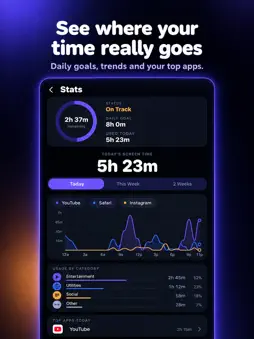
AppBlocker is a free app blocker for iPhone. Pick the apps that distract you, set a timer, and they stay locked until time runs out. Use it to focus, study, sleep better, reduce screen time, or break the habit of doomscrolling. No account. No sign-up. Your app choices stay on your device. WHAT APPBLOCKER DOES - Blocks distracting apps like Instagram, TikTok, YouTube and X for a set time - Lets you choose the duration every time, from 5 minutes to an hour - Keeps blocked apps locked for the full session - Shows your screen time today, this week and over two weeks, with an hourly chart and category breakdown - Tracks your focus streak so you can build a daily habit - Includes Auto-Break and Doomscroll Protection to help you stop endless scrolling - Works on iPhone using Apple's Screen Time and Family Controls HOW TO BLOCK APPS ON IPHONE 1. Open AppBlocker and tap Choose Apps to Block. 2. Pick the apps you want locked. 3. Choose how long, then start the block. 4. Your apps stay blocked until the timer ends. WHO IT'S FOR - Students who want to study without phone distractions - Anyone who wants to cut down on social media and screen time - People who want to sleep earlier and stop scrolling in bed - Remote workers and professionals protecting deep focus time - Parents and adults who want a simple focus timer for their own phone FREQUENTLY ASKED QUESTIONS Is AppBlocker free? Yes. AppBlocker is free to use. Optional rewarded ads let you end a block early if you really need to. Do I need an account? No. There is no sign-up and no account. Is my data private? Your app choices and Screen Time data stay on your device. AppBlocker does not send the apps you block or use to any server. How does AppBlocker block apps? It uses Apple's Screen Time and Family Controls, so blocking is handled by iOS itself. Why did Doomscroll Protection kick in late? iOS controls when apps receive Screen Time events. Low battery, Low Power Mode, or very late hours can delay them. Keep your battery charged and Low Power Mode off for the most reliable protection. AppBlocker is a simple, focused app blocker and screen time tracker for iPhone. One job, done well: block the apps that pull you in, and get your time back.
What's New
Version 1.0.9 2026-10-21
Fixes and performance improvements. Technical Analysis
Package Overview Basic metadata
Bundle ID
org.akhil.dogearlite Current Version 1.0.9
Minimum iOS 17.6
Package Size App Store Size
Package Metadata 0 / 2 version records
Detailed binary, privacy manifest, framework, and Info.plist results have not been indexed for this package yet. The verified App Store and archive metadata above remains available.
Developer Information
Known Version Records
0 version records with stored package metadata • 2 known version records
Stored metadata does not guarantee a package is currently available to download.
| Details | Version / IDs | Version date | Action |
|---|---|---|---|
| Not archived | App Store ID: 887602293 | Unknown | Request Version |
| Not archived | App Store ID: 886361149 | Unknown | Request Version |