
Preview



Description
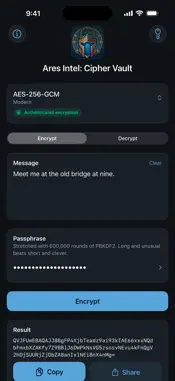
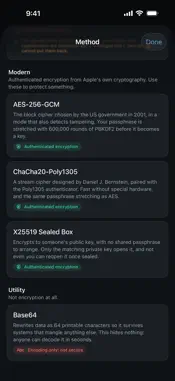
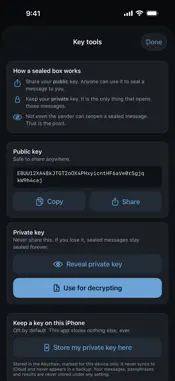
Ares Intel: Cipher Vault includes eleven ways to hide a message, from Caesar to authenticated AES-256, and every one of them says plainly whether it protects anything. Nothing leaves your iPhone unless you send it: the app has no networking code and requests no network permission, so it cannot transmit anything by itself. Turn on Airplane Mode and every feature still works, because none of them ever needed a connection. EVERY METHOD TELLS YOU THE TRUTH Most cipher apps present Caesar and AES side by side as though they were alternatives. They are not. One is a puzzle from the first century BC that a computer breaks instantly, and the other protects state secrets. Cipher Vault labels each of its eleven methods with what it actually is. The historical ciphers carry a badge reading "Historical: not secure". Base64 carries "Encoding only: not secure", because encoding is not encryption no matter how scrambled it looks. Only three methods are badged "Authenticated encryption", and those three are the ones to use when it matters. SEVEN HISTORICAL CIPHERS Caesar, ROT13, Atbash, Vigenere, Playfair, Rail Fence, and the Polybius Square. Each one comes with a note on where it came from and how it works, and the two that discard your spacing and punctuation say so before you use them rather than after. THREE MODERN METHODS AES-256-GCM and ChaCha20-Poly1305 both turn your passphrase into a key with 600,000 rounds of PBKDF2, which is what makes guessing attacks expensive instead of instant. Both detect tampering as well as encrypt, so a wrong passphrase and an altered message are reported as different problems instead of both producing nonsense. The X25519 sealed box encrypts to someone's public key, with no shared passphrase to arrange in advance. Only their private key opens it. Not even you can reopen it once it is sealed, which is the point. All of it is Apple's own cryptography. There is no third party code in this app of any kind. AND ONE UTILITY Base64 rewrites data as 64 printable characters so it survives systems that would otherwise mangle it, which is useful for moving text through email, config files and forms. It is not encryption, and the app says so on the method itself rather than letting it sit alongside the ciphers as though it were an alternative. Anyone can decode Base64 in seconds without a key of any kind. Seven historical, three modern, and this one. Eleven in total. NOTHING IS STORED Your messages, passphrases and results are never written to disk. Not to a file, not to a log, not to iCloud. Copied text clears from the clipboard after 60 seconds and never syncs to your other devices. The screen is covered when the app is not in front, so a decrypted message stays out of the app switcher. When you do share a result, it goes to whichever app you pick, and this app's guarantees end at that handoff. A decrypted message shared into another app lives by that app's rules. There is exactly one exception, and it is off until you turn it on: your private key can be kept in the Keychain, marked for this device only, so it never syncs and never appears in a backup. The app tells you this on its About screen rather than burying it here. NO ADS, NO TRACKING, NO ACCOUNTS No analytics. No advertising identifier. No sign up. No subscription.
What's New
Version 1.0.1 2026-09-09
Three fixes to typing and to how results are shown, all reported from real use. Typing in the message field is fixed. Text no longer disappears when you double... Technical Analysis
Package Overview Basic metadata
Bundle ID
GenshiMediaGroup.AresIntelCipherVault Current Version 1.0.1
Minimum iOS 17.0
Package Size App Store Size
Package Metadata 0 / 0 version records
Detailed binary, privacy manifest, framework, and Info.plist results have not been indexed for this package yet. The verified App Store and archive metadata above remains available.
Developer Information
Known Version Records
0 version records with stored package metadata
Stored metadata does not guarantee a package is currently available to download.
| Details | Version / IDs | Version date | Action |
|---|