Preview



Description
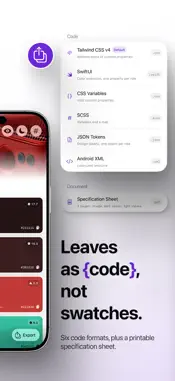
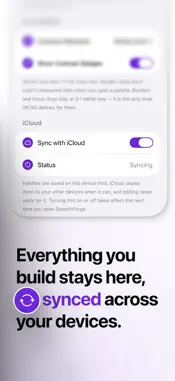
Getting colors out of a photo is the easy part. Turning them into something you can actually build with is where it falls apart. SwatchForge does the second part. Give it a photograph a product shot, a building, a texture, whatever your brand already looks like — and you get back a complete set of named colors. Backgrounds. Surfaces. Text at three weights. Two accents with soft and pressed variants. Borders. Success, warning and danger. Eighteen roles, each one knowing what it's for. Then it leaves as code. HOW IT WORKS Pick a photo from your library or take one. Crop to the part you want the colors from framing matters here, and a tight crop on the product gives you a very different palette than the whole room. Choose which roles your project actually uses, or leave them all on. Extract. Every palette holds onto its source photo. Come back next week, tap the photo, crop it differently and rebuild then either update the palette you're on or save the new one alongside it. IT EXPORTS AS CODE Tailwind CSS v4, SwiftUI, CSS custom properties, SCSS, JSON design tokens, Android XML. Pick a format and it comes out ready to paste, using your own token prefix and your preference on hex case and the # symbol. There's also a specification sheet: a multi-page PDF with the source photo, every role's HEX, RGB and HSL, and its measured contrast, laid out for dark and light. Useful for handing a theme to someone who isn't going to open Xcode. MEASURED, NOT GUESSED Every color is checked against the surface it sits on, and the ratio sits right there on the swatch. Set the standard to WCAG AA or AAA and the badges follow. When an accent comes out too close to its background, the generator keeps adjusting it until it clears the floor, so you don't end up with a nice color nobody can read. DARK AND LIGHT, BOTH Each palette is authored for one appearance and derives the other. Change a dark value and its light counterpart follows. Hand-pick a light value instead and it stays put. A preview screen puts the whole palette on a sample page, so you can judge it as a page rather than as a list of squares. NO ACCOUNT, NO SERVER There's nothing to sign up for, nothing gets uploaded, and all of it works in Airplane Mode. Photos are read on your device and stay there. If you want your palettes on more than one device, turn on iCloud sync they go to your own private iCloud database, Free. No ads, no in-app purchases. ______ Privacy Policy: https://craftdlab.com/projects/swatchforge/privacy Terms of Use: https://www.apple.com/legal/internet-services/itunes/dev/stdeula/
Technical Analysis
Package Overview Basic metadata
Bundle ID
com.craftdlab.SwatchForge Current Version 1.0
Minimum iOS 26.5
Package Size App Store Size
Package Metadata 0 / 0 version records
Detailed binary, privacy manifest, framework, and Info.plist results have not been indexed for this package yet. The verified App Store and archive metadata above remains available.
Developer Information
Known Version Records
0 version records with stored package metadata
Stored metadata does not guarantee a package is currently available to download.
| Details | Version / IDs | Version date | Action |
|---|