
Preview








Description
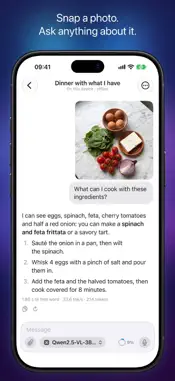
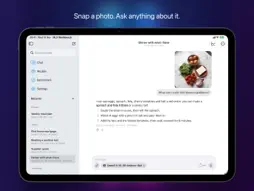
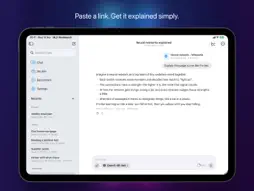
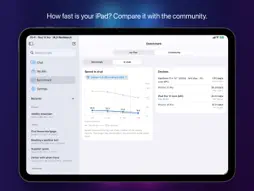
MLX Workbench is a private AI chat that runs on your own devices, with open models and Apple's open-source MLX framework. Your conversations stay yours and never go through a server: no cloud AI, no account, no subscription. CHAT, PRIVATELY • Open models such as Qwen, Llama, Gemma, Mistral and Phi, or Apple's on-device model on devices with Apple Intelligence • Works offline once a model is on your device • Thinking models show their reasoning, then the answer; math formulas are shown cleanly • Edit your messages, regenerate replies, compare versions, stop a reply and continue it • Long conversations can be summarized to free up the model's memory • Memory: notes about you that every chat starts from, which you can review and edit • Your own instructions and creativity for each chat • Search inside your chats; export a chat as Markdown, JSON or a ChatGPT-style archive YOUR MAC'S MODELS ON IPHONE AND IPAD • Use the models on your Mac, even those too big for your iPhone, at home and away • Pair once with a QR code: the chat travels straight between your devices, encrypted, with no server in between • Download models to your Mac from your iPhone and follow the progress • On the Mac, the app can wait in the menu bar while it serves your devices DOCUMENTS, PHOTOS, LINKS AND VOICE • Attach PDFs and text files; scanned pages are recognized on the device • Ask about a photo, the camera or an image in the clipboard, with a model that reads images • Paste a link: the page is downloaded and its article is read into the chat • Dictate instead of typing, with on-device speech recognition THE RIGHT MODEL FOR YOUR DEVICE • See what is ready, what is downloading and what fits your device's memory • Downloads continue in the background, with pause and resume • The expected speed of each model on your device, from the community results STATS FOR EVERY REPLY Time to first token, generation and prefill speed, how much of the conversation came from the cache, peak memory and thermal state, live while the reply is written. BENCHMARK AND COMMUNITY (FREE) Every device runs the same standard test: a fixed 512-token prompt, then exactly 128 tokens with greedy decoding, three measured runs, medians reported. Compare your device with everyone else's, model by model, including Apple's on-device model, and see how fast each model runs in real chats as the conversation grows. MLX WORKBENCH PRO The chat is part of MLX Workbench PRO: a one-time purchase, no subscription, shareable with Family Sharing. 30 free replies to get started, shared by your devices and the connection to your Mac. Benchmark, Community and the Models tab are free for everyone. PRIVACY No account, no tracking, no ads. Models run on your devices and your conversations stay there. With a connected Mac, the chat goes straight to your Mac, encrypted; iCloud only keeps your Mac's address and your free-reply count, never your conversations. When you paste a link, the page is downloaded from its website. While "Share results with the community" is on, the app shares anonymous standard benchmark results and, once a week, the median chat speed per model: numbers only, never the text of your conversations. Built for iPhone, iPad and iPhone Duo. The connected Mac needs MLX Workbench on a Mac with Apple silicon.
What's New
Version 1.2.0 2026-11-21
MLX Workbench 1.2 is our biggest update: a private AI chat that runs on your own devices. • Chat: talk with open models (Qwen, Llama, Gemma and more) or with A...MLX Workbench 1.2 is our biggest update: a private AI chat that runs on your own devices. • Chat: talk with open models (Qwen, Llama, Gemma and more) or with Apple's on-device model, without an account and without your words going through a server. • Connected Mac: use your Mac's models, even the biggest ones, from your iPhone and iPad, at home and away. Pair once with a QR code; the chat travels straight between your devices, encrypted. • Documents, photos, links and voice: attach PDFs and text files (scanned pages are read too), ask about a photo or the camera, paste a link to read an article, or dictate. • Memory: notes about you that every chat starts from, which you can review and edit. • Thinking models: see the reasoning, then the answer. Math formulas are shown cleanly. • Edit, regenerate, compare versions, stop and continue a reply; long chats can be summarized to free up memory. • Search inside your chats, and export a chat as Markdown, JSON or a ChatGPT-style archive. • Stats for every reply: time to first token, speed, cache and memory. • Downloads continue in the background, with pause and resume and progress in the Dynamic Island. • A new Models tab: what's ready, what's downloading and what fits your device. • On iPad, a sidebar with your chats, like Mail's. • Benchmark and Community stay free, now with Apple's on-device model and the speed measured in real chats. MLX Workbench PRO unlocks the chat with a one-time purchase, shareable with Family Sharing. 30 free replies to get started, shared by your devices and the connection to your Mac. Technical Analysis
Package Overview Basic metadata
Bundle ID
it.sofapps.mlxperformance Current Version 1.2.0
Minimum iOS 18.6
Package Size App Store Size
Package Metadata 0 / 2 version records
Detailed binary, privacy manifest, framework, and Info.plist results have not been indexed for this package yet. The verified App Store and archive metadata above remains available.
Developer Information
Known Version Records
0 version records with stored package metadata • 2 known version records
Stored metadata does not guarantee a package is currently available to download.
| Details | Version / IDs | Version date | Action |
|---|---|---|---|
| Not archived | App Store ID: 880144642 | Unknown | Request Version |
| Not archived | App Store ID: 880119432 | Unknown | Request Version |