
Preview





Description
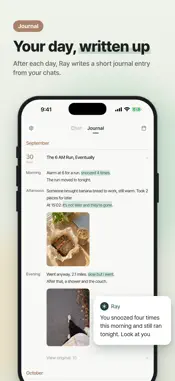
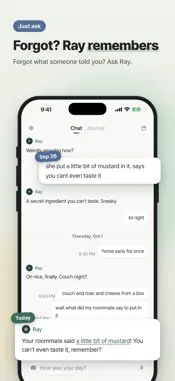
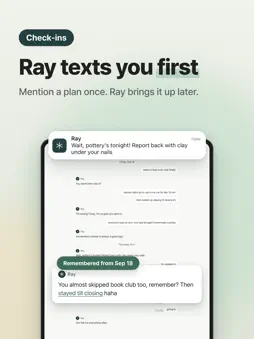
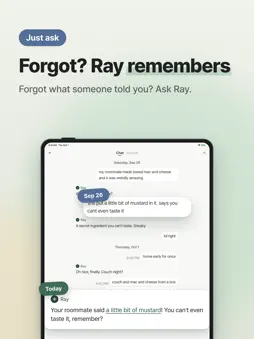
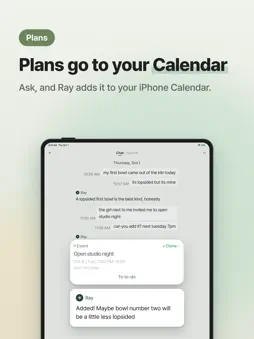
Tell Ray about your day, like you'd text a friend. You don't need a question or a neatly written story. Start with whatever you wanted to share. Ray is an AI you can talk to by text or voice. Send a photo, share a small win, or talk about something that's been on your mind. Ray can bring up things you told it days or weeks ago, so you can keep a conversation going over time. RAY CAN REACH OUT FIRST If you tell Ray about an upcoming interview, it can ask how it went afterward. Something you mentioned earlier can become the start of another conversation. YOUR CHATS BECOME A JOURNAL After the day ends, Ray writes a short journal entry from what you shared, with photos you sent. Read it later to revisit the day. You don't have to write a separate diary entry. A day closes at 4 a.m., so today's entry appears after that. Days with no conversation or nothing to keep won't have an entry. FIND SOMETHING YOU TOLD RAY Ask "What was the name of that restaurant?" or "When did I start the new job?" Ray looks through what you shared before. SHARE A NOTEBOOK PAGE Send a photo of a notebook page and Ray can transcribe it. ADD PLANS WHEN YOU ASK Ray can add events to your iPhone Calendar and to-dos to Reminders. YOUR ACCOUNT Sign in with Apple. Conversations and memories are saved to your account. You can delete your account from Settings. Ray supports English, Korean, Japanese, Traditional Chinese, Vietnamese, Thai, Indonesian, Malay, Filipino, Portuguese, French and Spanish. Ray subscriptions offer more daily conversations, deeper nightly journals, and reminders you ask Ray to send. You can keep using Ray without a subscription. Manage or cancel anytime in your App Store account settings under Subscriptions. Terms of Use: https://trace-agent-server.trace-c56.workers.dev/terms?lang=en Privacy Policy: https://trace-agent-server.trace-c56.workers.dev/privacy?lang=en
What's New
Version 1.2.9 2026-11-21
• The Journal tab now has a calendar at the top. It shows one week, and pulling it down opens the whole month, with a small photo from each day. • Tap a date on...• The Journal tab now has a calendar at the top. It shows one week, and pulling it down opens the whole month, with a small photo from each day. • Tap a date on the calendar to jump straight to that day's entry. • When viewing a photo, swipe sideways to see the day's other photos, and pull down or tap outside the photo to close it. • We fine-tuned voice calls to help them connect more reliably. Technical Analysis
Package Overview Basic metadata
Bundle ID
ai.corca.new-trace Current Version 1.2.9
Minimum iOS 18.0
Package Size App Store Size
Package Metadata 0 / 0 version records
Detailed binary, privacy manifest, framework, and Info.plist results have not been indexed for this package yet. The verified App Store and archive metadata above remains available.
Known Version Records
0 version records with stored package metadata
Stored metadata does not guarantee a package is currently available to download.
| Details | Version / IDs | Version date | Action |
|---|