
Preview

Description
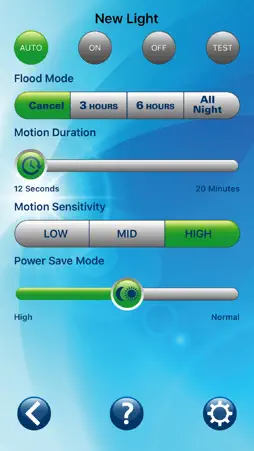
Used with compatible All-Pro Outdoor Security motion sensors, this app allows you to easily make adjustments to your outdoor lighting from the safety and convenience of your smart device. App Functions: This app features four primary modes of operation: AUTO, ON, OFF and TEST. AUTO mode causes the fixture to activate, only at night, whenever motion is detected. Motion settings such as sensitivity and duration can be adjusted based on your application. ON and OFF modes bypass the photocell and the motion sensor, allowing you to operate your fixture as needed. Useful for outdoor activities when you don’t want the light turning on and off with motion. TEST mode allows you to test the sensitivity of the motion sensor, day or night, by activating the light for just a few seconds once it senses motion. By walking through the areas within the desired range of your motion sensor, you can quickly make adjustments to the sensitivity to best suit your needs. Sensitivity can be adjusted between high, medium and low, determining the sensor range and also the relative size of the object needed to trigger the motion sensor. High sensitivity will extend the motion sensor range to its maximum distance, and also allow it to detect smaller movements closer to the sensor. Reduce the sensitivity to medium or low if you need to reduce the range or to prevent the light from coming on when you don’t need it to. Duration, or the amount of time the light will stay on after detecting motion, can be fine-tuned from 12 seconds up to 20 minutes. Flood Mode allows you to temporarily bypass the motion sensor, extending the amount of time your lights stay ON. Choose between 3 hours, 6 hours, or until the sun rises again. Power Save Mode determines when at night the light will come on, and when in the morning it will go off. Setting this to “High” will cause the light to come on later at night when it is very dark, and turn off earlier in the morning just when the sun starts to light up the sky. This setting is also helpful to reduce photocell sensitivity in installations where other light sources or reflections interfere with photocell operation.
Technical Analysis
Package Overview Basic metadata
Bundle ID
com.eaton.corp.AllProLighting Current Version 1.0
Minimum iOS 8.0
Package Size Latest Recorded Package Size
Package Metadata 1 / 1 version records
Detailed binary, privacy manifest, framework, and Info.plist results have not been indexed for this package yet. The verified App Store and archive metadata above remains available.
Developer Information
Known Version Records
1 version record with stored package metadata
Stored metadata does not guarantee a package is currently available to download.
| Details | Version / IDs | Version date | Action |
|---|---|---|---|
 72.14 MB | v1.0 App Store ID: 841761498Build: 22 | 2021-04-22 07:21:22 | Get Version |