
Preview




Description
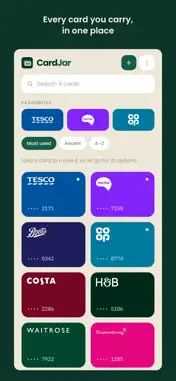
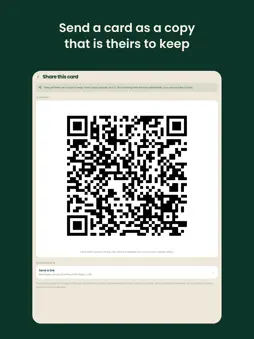
Your loyalty cards, on your iPhone and your iPad. No account, no sign-up, and the app sends nothing anywhere. CardJar is a loyalty card wallet that keeps your cards on your device. There is no sign-up screen, because there is nothing to sign up to. No email address, no password, no profile, and no server holding a list of the shops you use. No analytics, no crash reporter, no advertising identifier, and nothing that reports anything back to us. READY AT THE TILL Open, tap, scan. The barcode is drawn to whole device pixels and the screen goes to full brightness, because a fractionally scaled bar edge is a failed scan and a failed scan in a queue is why people give up on loyalty apps. It works in aeroplane mode, because your cards are simply there. Press and hold the app icon and your three most used cards are right there. BRING YOUR CARDS ACROSS Coming from an app that shut down? A folder of screenshots will do. CardJar reads each picture twice - the barcode, and the words printed around it - and matches those words against the retailers it already knows, so your cards arrive with names on them instead of as a list of numbers to type names against. Both readings happen on the device: the picture, the words and the name never leave it. SHARING THAT ENDS WHEN YOU SEND IT Send a card to your partner and they get a copy to keep. No shared account, no linked state, no sync, nothing to revoke. The card travels inside the part of the link after the # symbol, which browsers never send to a server, so it goes between the two devices and nowhere else. BACKUP THAT IS ACTUALLY YOURS Export your jar as one encrypted file, sealed with a passphrase you choose. Save it to Files, or anywhere else the share sheet reaches, and keep it where you keep important things. It opens on any device - a new one, or this one after a wipe - and nobody holds a copy of that passphrase, us included, which is the same fact as nobody else being able to open it. LOCKED, IF YOU WANT IT Turn the lock on and Face ID, Touch ID or your passcode stands between picking the phone up and reading the jar. The Home Screen menu stops naming your cards while it is on, because a list of shops readable without unlocking anything would give most of that back. CARDS THAT LOOK LIKE YOUR CARDS Your jar shows each shop's own logo on its own colour, so you find a card by recognising it rather than by reading a list of names. Every logo is compiled into the app along with the retailer list. CardJar never fetches one, because asking a server for a shop's logo is telling that server which shops you use. MADE FOR IPAD TOO One app, both devices, and the same jar drawn for the screen it is on: a grid that fills an iPad rather than a phone layout stretched across it. WHAT IT RECOGNISES 508 retailers across the United Kingdom, the United States, Canada, Australia, Ireland, Germany, Poland, France, Spain, Italy, the Netherlands and Ukraine, all compiled into the app - so it never asks a server about a card you hold, and every one of them arrives with its logo already on the card. Any card that is not on the list still works; it just arrives with its initial on a colour of its own. Barcodes: EAN-13, EAN-8, UPC-A, UPC-E, Code 128, Code 39, Code 93, ITF, Codabar, QR, Data Matrix and Aztec. BEING STRAIGHT WITH YOU CardJar speaks English, German, Polish, Ukrainian, French, Spanish, Italian and Dutch, and follows your device's language, which you can change in Settings; a change takes effect the next time the app starts. PDF417 cards can be scanned and stored, but this version cannot draw them back - the app says so when you add one rather than letting you find out at a till. There is no Apple Watch app in this release. No analytics. No crash reporter. No advertising identifier. No ads.
What's New
Version 1.1.2 2026-10-26
Nothing new in the app this time. We've refreshed the App Store page with new screenshots, including iPhone Duo. Technical Analysis
Package Overview Basic metadata
Bundle ID
app.cardjar Current Version 1.1.2
Minimum iOS 15.0
Package Size App Store Size
Package Metadata 0 / 0 version records
Detailed binary, privacy manifest, framework, and Info.plist results have not been indexed for this package yet. The verified App Store and archive metadata above remains available.
Developer Information
Known Version Records
0 version records with stored package metadata
Stored metadata does not guarantee a package is currently available to download.
| Details | Version / IDs | Version date | Action |
|---|