
Preview



Description
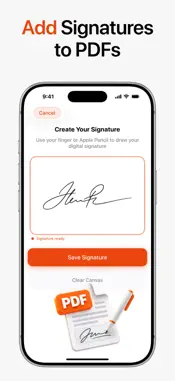
Converter, Editor & Signatures Create high-quality PDFs from photos and documents, scan paper pages with automatic edge detection, organize page structure, and add reusable signatures – using a focused set of tools designed for everyday and professional document workflows. Convert to PDF 1. Convert photos and documents into high-quality PDF files 2. Supported formats include images (.jpg, .png), text and web files (.txt, .html), and office documents (.docx, .xls), enabling conversion from multiple content types into a single PDF format 3. Import files by capturing new images with the camera or selecting existing content from your device or connected sources 4. Before creating the final PDF, adjust page sequence, combine multiple inputs into one document, or split content into separate files as needed Scan Documents Scan documents using your device camera with automatic document edge detection Document Manager – Access all documents created in the app – Sort by date, format, or type (scanned, edited, signed) – Search by name and manage files with options to delete, rename, or share Add Signatures – Create signatures in a dedicated section using your finger or Apple Pencil – Save signatures for future use and insert them into PDF files when needed Basic Version (Free) • 1 PDF creation included • Includes PDF creation from images and documents • Includes document scanning with automatic edge detection • Access to document preview, page reordering, and file management tools • Ability to create and use signatures Premium Version (Paid) • Unlimited conversions and document scans • No limits on the number of processed files or pages • Full support for all available import formats (including .docx, .txt, .html, .xls, and others) • Access to importing from all supported sources, including cloud services • Unrestricted use of editing tools (reorder, add/remove pages, rename files) • Unlimited use of saved signatures across documents Lens PDF Scanner for Office offers a structured and efficient way to prepare, organize, and finalize PDF documents for storage or sharing. Privacy Policy: https://docs.google.com/document/d/1CB_2_6EvVw3ZtoH_stpf-q77QFvE708u3TfuwJQszOw/edit?usp=sharing Terms & Conditions: https://docs.google.com/document/d/1B4OTsoMGx92aV7YHLPUl6yJsqVMIYvwAHlnAdIsdACQ/edit?usp=sharing
What's New
Version 1.0.5 2026-11-02
Fixed minor bugs in the application. Technical Analysis
Package Overview Basic metadata
Bundle ID
com.lasseulmer.pdf Current Version 1.0.5
Minimum iOS 17.0
Package Size App Store Size
Package Metadata 1 / 3 version records
Detailed binary, privacy manifest, framework, and Info.plist results have not been indexed for this package yet. The verified App Store and archive metadata above remains available.
Known Version Records
1 version record with stored package metadata • 3 known version records
Stored metadata does not guarantee a package is currently available to download.
| Details | Version / IDs | Version date | Action |
|---|---|---|---|
| 7.54 MB | v1.0.3 App Store ID: 887745199Build: 1.0.3 | 2026-07-03 00:19:04 | Get Version |
| Not archived | App Store ID: 887274914 | Unknown | Request Version |
| Not archived | App Store ID: 883670762 | Unknown | Request Version |