
Preview


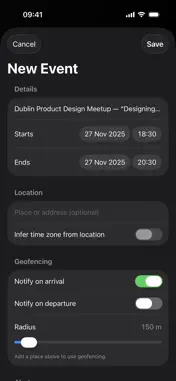
Description
Screen Actions turns on-screen text into things you can use — Contacts, Calendar events, Reminders or a CSV — fast and entirely on device. Select text in Safari, share from any app, or scan a photo/screenshot and pick an action. No accounts. No servers. No tracking. What you can do • Add to Calendar — Detects dates/times in text and creates an event. Optional location, alert, travel-time alarm, and geofenced arrive/leave notifications. • Create Reminder — Finds tasks/deadlines and makes a reminder in the list you choose. • Extract Contact — Pulls names, emails, phones and addresses into Contacts (you review before saving). • Receipt → CSV — Converts receipt-like text into a clean CSV you can save or share. Ways to use it • Safari Web Extension — Select text on any webpage, tap the extension, and choose an action. • Share Extension — Send text or images from any app into Screen Actions. • Scan (live) — Use the camera to scan text or barcodes/QR and jump straight into the right editor. • Auto Detect — Paste/scan once; the app picks the best action and opens its editor so you can tweak before saving. iOS 26 “Document Mode” (on supported iPhones) • Reads real tables and structured text on device for better results. • Receipts → CSV v2: photos/screenshots become accurate rows & columns. • Batch contacts: a photographed sign-up sheet can become multiple Contacts. Privacy by design • Everything runs on your device using Apple frameworks (Vision OCR/Document Mode, Data Detectors, EventKit, Contacts, MapKit). • We don’t collect personal data, don’t run servers and don’t use third-party analytics. • Permissions are only requested when you use a feature that needs them (Calendars, Reminders, Contacts, Camera, Location for geofencing). Free vs Pro • Free includes daily usage for key features. • Screen Actions Pro (optional in-app purchase) removes daily limits and adds quality-of-life extras such as “Remember last action” in the Safari popup. Prices are shown locally in the app. Why Screen Actions? • Fast: turn messy text into clean, structured data in seconds. • Accurate: on-device intelligence improves detection and table reading. • Private: no accounts, no tracking, no ads. • Flexible: works from Safari, the share sheet, live scan or paste. Requirements • iPhone, iOS 26 or later. Availability of Document Mode features may vary by device/language. Support: [email protected] Terms of Use (EULA): https://www.apple.com/legal/internet-services/itunes/dev/stdeula/ Privacy Policy: https://screenactions.com/privacy.html
Technical Analysis
Package Overview Basic metadata
Bundle ID
com.conornolan.Screen-Actions Current Version 1.0.1
Minimum iOS 26.0
Package Size App Store Size
Package Metadata 0 / 1 version records
Detailed binary, privacy manifest, framework, and Info.plist results have not been indexed for this package yet. The verified App Store and archive metadata above remains available.
Developer Information
Known Version Records
0 version records with stored package metadata • 1 known version records
Stored metadata does not guarantee a package is currently available to download.
| Details | Version / IDs | Version date | Action |
|---|---|---|---|
| Not archived | App Store ID: 878094477 | Unknown | Request Version |