
Preview



Description
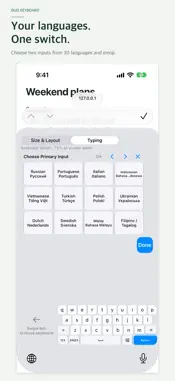
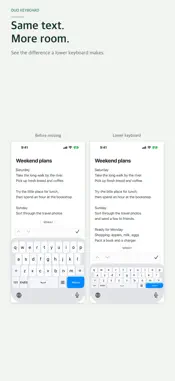
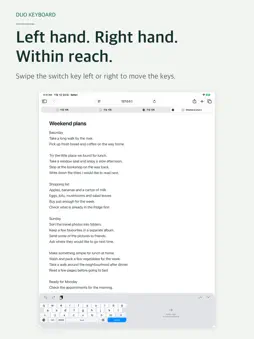
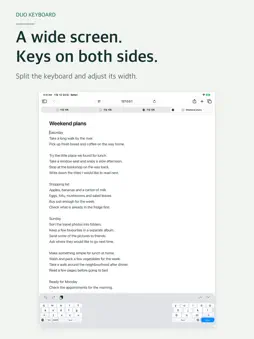
Lower your keyboard to see more of your text, and bring the keys closer to either thumb. Duo Keyboard lets you choose the size and position that suit your hands. Split the keys on a wide screen and switch between two inputs chosen from 30 languages and emoji. Buy once, with no subscription or in-app purchases. MORE ROOM FOR YOUR TEXT Adjust keyboard height and width while watching the keys change. Settings open above the live keyboard. Make a one-handed layout smaller or expand it to the available width. Center fills the keyboard width assigned by iOS. LEFT HAND OR RIGHT, KEEP THE KEYS CLOSE Swipe the switch key left or right for one-handed placement, or up to return to full width. Swipe the empty keyboard area to bring the keys to the other side. Hold the switch key to open settings. SPLIT THE KEYS ON A WIDE SCREEN Place the keys on both sides when holding your device with two hands. Swipe the switch key down to split when the input area is wide enough. The two banks keep a gap as you resize them. Narrow and wide layouts remember their own size and position. CHOOSE YOUR TWO INPUTS In Typing, choose a language and layout for Primary and Secondary. Tap the switch key to move between them. Pair English with Spanish, French with emoji, or choose another combination that works for you. 30 INPUT LANGUAGES Korean, English, Spanish, French, German, Russian, Portuguese, Italian, Indonesian, Vietnamese, Turkish, Polish, Ukrainian, Dutch, Swedish, Malay, Filipino/Tagalog, Arabic, Hindi, Thai, Bengali, Urdu, Persian, Chinese, Japanese, Marathi, Javanese, Nigerian Pidgin, Telugu and Tamil. Chinese supports Pinyin with Simplified and Traditional conversion; Japanese supports romaji with kana and kanji conversion; Vietnamese supports Telex. Arabic, Hindi, Thai, Bengali, Urdu, Persian, Marathi, Telugu and Tamil use paged character entry. Javanese uses Latin script. General autocorrection and next-word prediction are not provided. FAMILIAR LAYOUTS, USEFUL CONTROLS • English QWERTY and 12-key • Korean QWERTY, Danmoum, Cheonjiin, Naratgeul, Cheonjiin Plus and Vega • A three-column grid for numbers and symbols in compact layouts • Optional number row and settings key, switch-key placement and English auto-capitalization • Adjustable glass opacity; Liquid Glass on iOS 26 and later, with a compatible appearance on earlier supported versions • Swipe on Space to move the text cursor • Return follows the input field's action; hold it for a newline NO FULL ACCESS REQUIRED Keyboard input is not logged or automatically transmitted. Duo Keyboard does not request Full Access. Input processing and Chinese/Japanese dictionary conversion run on your device. Try layouts in the app before enabling the keyboard. Optional bug reports are emails you review and send yourself; the report and reply address are received for support. GET STARTED 1. Open Settings > General > Keyboard > Keyboards. 2. Tap Add New Keyboard and choose Duo Keyboard. 3. In a text field, hold the globe key and select Duo Keyboard. 4. Hold the actual keyboard's switch key to set size, placement and inputs. BEFORE YOU BUY • iOS controls the available width and bottom system area. Margins may remain on some devices or in some apps. Split mode requires a wide enough input area. • Empty areas around or between the keys remain part of the keyboard. They do not reveal the document underneath. There is no free-floating keyboard or system mouse pointer. • iOS may use its own keyboard in password or certain phone fields, and in apps that disallow third-party keyboards. Some fields do not accept newlines. • In-app practice settings are separate from the actual keyboard's saved settings. • On a wide screen, after moving the keys and reopening the keyboard, the previous position may briefly appear before the saved position is displayed.
What's New
Version 1.1.0 2026-11-01
Duo Keyboard now supports 30 input languages, with language and layout settings together in one place. • New options include German, Russian, Arabic, Hindi and... Technical Analysis
Package Overview Basic metadata
Bundle ID
com.moonmini.teumkeyboard Current Version 1.1.0
Minimum iOS 17.0
Package Size App Store Size
Package Metadata 0 / 0 version records
Detailed binary, privacy manifest, framework, and Info.plist results have not been indexed for this package yet. The verified App Store and archive metadata above remains available.
Developer Information
Known Version Records
0 version records with stored package metadata
Stored metadata does not guarantee a package is currently available to download.
| Details | Version / IDs | Version date | Action |
|---|