
Preview



Description
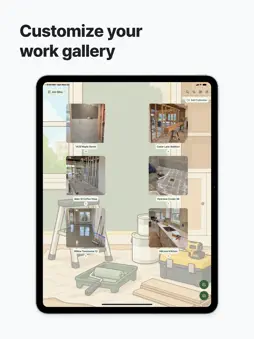
PhotoKip is a work and site camera that keeps work photos and videos separate from personal ones. Shoot site photos with a board, timestamp, or logo watermark and make photo sheet PDFs for reports. 1. Take work photos and videos separately Use your regular camera for everyday moments and PhotoKip for work. Switch between photo and video. Captures stay in PhotoKip and aren't automatically added to the Photos app. 2. Save straight to your chosen Collection Pick a Collection from any Space at the top of the camera, or create one. Each photo and video saves there immediately. Switch Collections between shots to change where new captures go. 3. Add a board to site photos Shoot with a board, a table of site info (project name, location, date, details), not a physical one. Date and address can auto-fill. Use built-in templates (General construction, Inspection, Material check, Defect repair) or build your own in My boards by adding and merging rows and cells. 4. Create photo sheet PDFs Turn a Collection into PDFs with Grid, Table, Side table, or Compare (Before/After) layouts, photos per page, A4 or Letter, cover page, page numbers, and captions from board text, date and time, and notes. Preview first; PDFs stay in the app to view, share, or print. Creating PDFs and Excel files requires Premium. 5. Timestamps and logo watermarks Stamp each shot's date, time, and address, plus custom text like “Site 3 inspection,” choosing position, size, text color, background, and font, even a digital clock style. Watermark with a business logo from the Photos app: crop it or remove its background, and pick one of 9 positions, size, and opacity. Save up to 5 logos. Boards, timestamps, and watermarks are free, one per photo, and go on existing photos in bulk, keeping originals for later edits or removal. 6. Organize with Spaces and Collections A Space groups a site or project; Collections hold related photos and videos. 7. Browse, add notes, and search Browse in a grid or by date, add notes, and search them with Collection names and descriptions. 8. Import existing work photos Import site photos and screenshots from the Photos app: pick an album, add items to a Collection or skip them, and keep or delete the originals. Leave undecided items in Uncategorized. You can also share from other apps. 9. Make your work gallery your own Pick a background per Space and change theme colors, fonts, and the app icon. Some options require Premium. 10. Share and export Share via messaging or email apps, or export a Collection as an album to the Photos app. 11. No account. Photos stay on your device Photos, videos, collection details, and notes stay on your device, without uploading to PhotoKip servers. Enable iCloud sync on iPhone and iPad with iOS/iPadOS 17 or later, and Mac with Apple silicon, using the same iCloud account. Uploading new items and edits requires Premium. Sync isn't a backup: deletions apply to other devices too. Unsynced items may be lost if you uninstall. Export important photos and videos to the Photos app or back them up elsewhere first. 12. Free use and Premium • Free: Save up to 100 photos and videos across all Spaces and Collections, excluding Uncategorized. Collections are unlimited. • Premium: Save without a photo or video count limit, create photo sheet PDFs, and unlock more customization options. Choose monthly, annual, or one-time lifetime access, with the same benefits while active. • Subscriptions renew automatically until cancelled in the store. Uninstalling or buying lifetime access does not cancel an existing subscription. • Expiry does not delete saved items. Prices and terms are shown before purchase. Keep today's work photos separate with PhotoKip. Privacy Policy: https://www.photokip.app/en/privacy Terms of Use: https://www.photokip.app/en/terms Apple Standard EULA: https://www.apple.com/legal/internet-services/itunes/dev/stdeula/
What's New
Version 2.2.0 2026-11-23
- Added board, timestamp, and watermark features. - Added photo sheet PDF creation. - Added Collection lock. - Added a Custom sort order. - Made camera zoom eas...- Added board, timestamp, and watermark features. - Added photo sheet PDF creation. - Added Collection lock. - Added a Custom sort order. - Made camera zoom easier to use. - Improved Camera Control support so you can press it to take photos right away. Technical Analysis
Package Overview Basic metadata
Bundle ID
com.memvault Current Version 2.2.0
Minimum iOS 15.5
Package Size App Store Size
Package Metadata 0 / 2 version records
Detailed binary, privacy manifest, framework, and Info.plist results have not been indexed for this package yet. The verified App Store and archive metadata above remains available.
Developer Information
Known Version Records
0 version records with stored package metadata • 2 known version records
Stored metadata does not guarantee a package is currently available to download.
| Details | Version / IDs | Version date | Action |
|---|---|---|---|
| Not archived | App Store ID: 887980644 | Unknown | Request Version |
| Not archived | App Store ID: 886806432 | Unknown | Request Version |