
Preview






Description
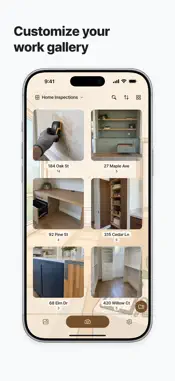
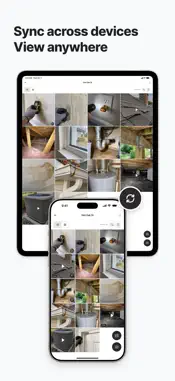
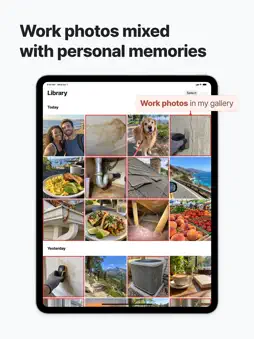
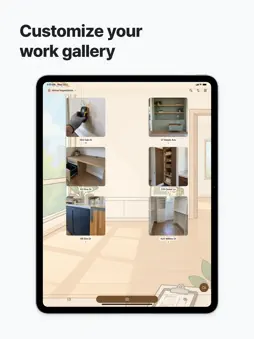
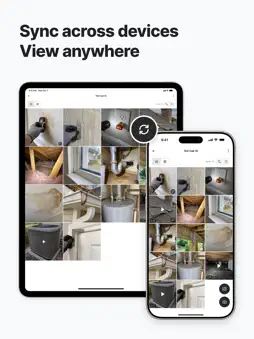
PhotoKip keeps work photos and videos separate from personal ones. Choose a Collection before shooting to save each capture there. Add notes and import work photos from the Photos app or other apps. 1. Take work photos and videos separately Use your regular camera for everyday moments and PhotoKip for work. Switch between photo and video. Captures stay in PhotoKip and aren't automatically added to the Photos app. 2. Save straight to your chosen Collection Pick a Collection from any Space at the top of the camera, or create one. Each photo and video saves there immediately. Switch Collections between shots to change where new captures go. 3. Organize with Spaces and Collections A Space groups a site or project; Collections hold related photos and videos. For an “Austin 2-Bed Condo,” create “Cabinetry,” “Bath & Tile,” “Electrical,” and “Doors & Hardware” Collections. Use separate Spaces for other sites. Covers and item counts help you browse. 4. Browse, add notes, and search View photos and videos in a grid or by date. Open photos and play videos. Add notes like “Recheck door alignment and finish” or “Check drawer slide operation.” A note icon marks annotated items. Search your notes and Collection names and descriptions. 5. Import existing work photos Import site photos, screenshots, and floor plan images from the Photos app. Choose an album, then add items to a Collection or skip them. Review before applying, and choose whether to keep or delete imported photos' originals. Leave undecided items in Uncategorized. Each album shows total, imported, skipped, and remaining counts and progress. You can also share photos from other apps to PhotoKip to keep references with your captures. 6. Make your work gallery your own Choose a background for each Space: Interior Renovation, Boiler Service Visit, Product Photo Studio, or Auto Repair Bay. Change theme colors, fonts, and the app icon. Some options require Premium. 7. Share and export Share selected photos and videos through messaging or email apps. Export a Collection as an album to the Photos app for use elsewhere. 8. No account. Photos stay on your device Start without signing up. Photos, videos, collection details, and notes stay on your device, without uploading to PhotoKip servers. View saved items offline. Enable iCloud sync on iPhone and iPad with iOS/iPadOS 17 or later, and Mac with Apple silicon, using the same iCloud account. Uploading new items and edits requires Premium. Sync isn't a backup: deletions apply to other devices too. Unsynced items may be lost if you uninstall. Export important photos and videos to the Photos app or back them up elsewhere first. 9. Free use and Premium • Free: Save up to 50 photos and videos across all Spaces and Collections, excluding Uncategorized. Collections are unlimited. • Premium: Save without a photo or video count limit and unlock more customization options. Choose monthly, annual, or one-time lifetime access, with the same benefits while active. • Subscriptions renew automatically until cancelled in the store. Uninstalling or buying lifetime access does not cancel an existing subscription. • Expiry does not delete saved items. Prices and terms are shown before purchase. Keep today's work photos separate with PhotoKip. Privacy Policy: https://www.photokip.app/en/privacy Terms of Use: https://www.photokip.app/en/terms Apple Standard EULA: https://www.apple.com/legal/internet-services/itunes/dev/stdeula/
What's New
Version 2.0.6 2026-11-02
- Added a mode that lets you view and work with multiple photos at once when importing from the Photos app. - Improved onboarding to feel more natural. Technical Analysis
Package Overview Basic metadata
Bundle ID
com.memvault Current Version 2.0.6
Minimum iOS 15.5
Package Size App Store Size
Package Metadata 0 / 2 version records
Detailed binary, privacy manifest, framework, and Info.plist results have not been indexed for this package yet. The verified App Store and archive metadata above remains available.
Developer Information
Known Version Records
0 version records with stored package metadata • 2 known version records
Stored metadata does not guarantee a package is currently available to download.
| Details | Version / IDs | Version date | Action |
|---|---|---|---|
| Not archived | App Store ID: 887980644 | Unknown | Request Version |
| Not archived | App Store ID: 886806432 | Unknown | Request Version |