Preview
Description
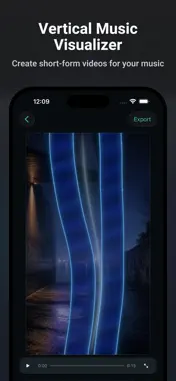
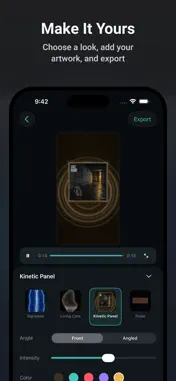
BeatLuster is a video maker for music artists, producers, and creators who want to create audio-reactive music visuals. No filming or complex timeline editing is required. Choose your audio, combine a Look with Artwork, check the result in Preview, and export an MP4 with audio. Promote a new track, share a release, create short-form videos for social media and video-sharing platforms such as YouTube and TikTok, create ads, or deliver client work. In addition to vertical 9:16 video, BeatLuster supports 1:1 and 16:9 formats. ◆ Create in Three Steps 1. Choose your audio and set the Clip you want to use. 2. Pick a Look and optionally add Artwork. 3. Check the result in Preview and export your video. ◆ Four Production Looks • Kinetic Panel • Signature • Living Core • Pulse Each Look responds to music with its own motion and visual character. Artwork treatment and available controls vary by Look. Where controls are available, you can adjust settings such as reactivity and color. Save your edits as a Project so it is ready for your next export. ◆ Export Options Videos are exported as MP4 files with audio. • Clip: Load the full audio, choose where the Clip starts, and use up to 60 seconds. Depending on the audio length, choose 15, 30, or 60 seconds. When the audio is shorter than 60 seconds and its full length is not already one of those choices, you can also choose Whole track. Audio shorter than 15 seconds uses the full source automatically. • Aspect ratio: 9:16, 1:1, or 16:9 • Frame rate: 30fps or 60fps • Destinations: Photos, Files, or other apps through Share ◆ Free and BeatLuster Pro With Free, you can keep one Project at a time and export one video in total with no watermark. Free and Pro use the same export quality. Editing and Preview remain available after you have used your free export. With Pro, you can create and duplicate Projects and export videos without these limits. ◆ Using Your Completed Videos Completed videos created with BeatLuster may be used for the following purposes under the Terms of Use: • Social media posts • Distribution and monetization on video-sharing platforms such as YouTube and TikTok • Advertising and promotion • Client work and delivery of completed videos You may not sell or distribute BeatLuster visuals as stock footage, reusable video or loop assets, templates, or other materials intended for reuse in another creative work. You are responsible for securing the necessary rights and permissions for the audio, Artwork, and other materials you use. See the BeatLuster License Guide for details: https://www.codepaint.app/license-guide-beatluster ◆ BeatLuster Pro Plans BeatLuster offers Weekly and Monthly auto-renewable subscriptions and a Lifetime one-time purchase. Prices may vary by country, region, and time of year. Weekly and Monthly plans renew automatically unless canceled at least 24 hours before the end of the current period. Your Apple Account is charged within 24 hours before renewal. You can manage or cancel a subscription in Settings > Apple Account > Subscriptions. Lifetime is a one-time purchase and does not auto-renew. ◆ Terms of Use https://www.codepaint.app/terms-beatluster ◆ Privacy Policy https://www.codepaint.app/privacy-policy-beatluster ◆ Disclaimer & Trademarks BeatLuster is an independent tool and is not sponsored, endorsed, or affiliated with any third-party social media platform.
What's New
Version 1.0.1 2026-09-15
BeatLuster 1.0.1 makes creating and exporting smoother. • Use the whole track as your Clip for audio under 60 seconds. • Fine-tune Preview playback by tapping ... Technical Analysis
Package Overview Basic metadata
Bundle ID
com.codepaint.beatluster Current Version 1.0.1
Minimum iOS 18.1
Package Size App Store Size
Package Metadata 0 / 0 version records
Detailed binary, privacy manifest, framework, and Info.plist results have not been indexed for this package yet. The verified App Store and archive metadata above remains available.
Developer Information
Known Version Records
0 version records with stored package metadata
Stored metadata does not guarantee a package is currently available to download.
| Details | Version / IDs | Version date | Action |
|---|