
Preview





Description
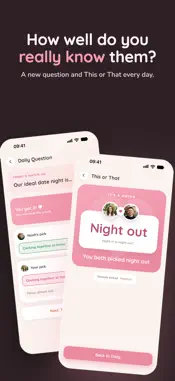
Perfect Pear is a private little space for couples. Once you and your partner pair up, everything you share stays between the two of you. Daily photos Each of you shares a photo a day, shown side by side on both your home screens. Add a caption, react to your partner's photo, or send a quick drawing instead. Moods Choose from twelve hand-drawn faces or draw your own. Your mood appears on your partner's home screen and widget for the day, so they know how you're doing at a glance. Daily games A new question every morning: answer it, then guess your partner's answer, and compare once you've both played. This or That adds a quick second game each day, and a streak keeps track of how many days in a row you've played. Shared calendar Keep date nights, trips and appointments in one place. Plans can be for both of you or just one, upcoming highlights get a countdown, and everything can be copied to your phone's calendar. Widgets Home Screen widgets show your partner's latest photo and mood, a countdown, how many days you've been together and your next plans. The countdown is also available on the Lock Screen. Designed for iPhone and iPad, and on iPhone Duo the app spans both screens when it's open. Pairing takes just an invite code or link. A single subscription covers you both, with a one-week free trial. Terms of Use (EULA): https://www.apple.com/legal/internet-services/itunes/dev/stdeula/
What's New
Version 1.1.0 2026-10-17
Share your mood Pick a face or draw your own, add a word, and your partner sees it on their Home and widget for the day. Tap their badge to see how they feel. ... Technical Analysis
Package Overview Basic metadata
Bundle ID
com.codenoodle.perfectpear Current Version 1.1.0
Minimum iOS 16.4
Package Size App Store Size
Package Metadata 0 / 0 version records
Detailed binary, privacy manifest, framework, and Info.plist results have not been indexed for this package yet. The verified App Store and archive metadata above remains available.
Developer Information
Known Version Records
0 version records with stored package metadata
Stored metadata does not guarantee a package is currently available to download.
| Details | Version / IDs | Version date | Action |
|---|