
Preview







Description
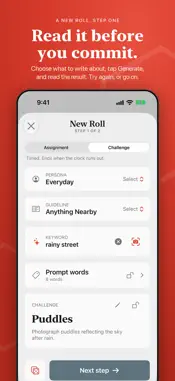
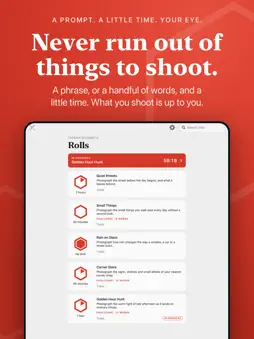
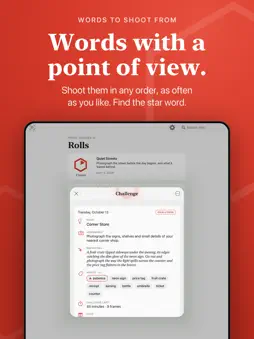
Never run out of things to shoot. One Roll gives you a reason to look. Roll a prompt, from a single phrase to a handful of words, set a little time, and go and see what's out there. The subject and the way you shoot it are entirely up to you. Working to a little time teaches you to notice things quickly, and that's a skill that stays with you long after the clock stops. TWO KINDS OF ROLL • Assignment: a phrase, at your own pace. Finish when you're ready. • Challenge: words and a clock. The clock is the push to notice, not the point. WORDS TO SHOOT FROM Add prompt words to a roll and tap each one as you shoot it, in any order, as often as you like. Every roll has one star word to make sure you look for, and it always comes first. Choose how far it asks you to look: something you can point at, a quality to find, or an idea to interpret. Tapped the wrong one? Take a frame back. WRITE YOUR OWN, OR LET ONE FIND YOU A new roll takes two steps. First, choose what to write about and tap Generate. Read it, try again, or go on. Then set the details. Lock the parts you love and write the rest again. Give it a keyword, or snap a scene and let One Roll turn what it sees into a prompt. Edit any word by hand. It all happens on your device. NEW WAYS TO WRITE • Personas and guidelines: choose who writes your roll (a friendly teacher, a field guide, a street mentor, and more) and what it is about (landscape, portraits, buildings, your own town, and more). Duplicate one and make it yours. • Surprise Me: press and hold the plus, and one tap makes a whole roll the way you usually shoot. • A Word widget that offers something to look for, and makes a roll when you tap it. SHARE A ROLL Write a challenge and send it by link or QR code. Friends, followers or readers open it in One Roll and make their own take on the same words. A shared result lets everyone compare how differently the same words can be seen. It's not a ranking. KEEP WHAT YOU MAKE • Save a Start Card or an End Card to your photos • Add a roll to Apple Wallet • Closing notes that describe your numbers, never your photos • Search your rolls by title, words, note or inspiration • Archive what you've finished MADE FOR YOUR CAMERA Choose the settings you want to think about (aperture, ISO, shutter speed and more) and One Roll includes them in each roll. Let them be picked for you, or choose the exact setting you want and keep it. Ask for color or black and white. Use any camera you like. PRIVATE BY DESIGN No account. No ads. No tracking. One Roll runs entirely on your device, and nothing about your rolls is collected. The only time it goes online is when you ask it to, to sign an Apple Wallet pass or to complete a purchase. FREE TO START, PRO WHEN YOU WANT MORE Run and share up to 8 rolls free, including imported challenges. One Roll Pro adds unlimited rolls, personas and guidelines, Surprise Me and the Word widget, keywords and camera-scene prompts, prompt words and hints, the star word's level, Wallet passes, Start and End Cards, and the ability to edit the option library. Choose a monthly or yearly subscription, or pay once. Purchases are per platform, so an iPhone purchase doesn't unlock other platforms. Nothing you've made is ever deleted or hidden if Pro ends. One Roll is made by Code Nine Labs, LLC. Terms of Use (EULA): https://www.apple.com/legal/internet-services/itunes/dev/stdeula/ Privacy Policy: https://getoneroll.app/privacy
What's New
Version 1.4.0 2026-10-28
Added ability to import and export personas and guidelines Technical Analysis
Package Overview Basic metadata
Bundle ID
com.codeninelabs.oneroll Current Version 1.4.0
Minimum iOS 17.0
Package Size App Store Size
Package Metadata 0 / 0 version records
Detailed binary, privacy manifest, framework, and Info.plist results have not been indexed for this package yet. The verified App Store and archive metadata above remains available.
Developer Information
Known Version Records
0 version records with stored package metadata
Stored metadata does not guarantee a package is currently available to download.
| Details | Version / IDs | Version date | Action |
|---|