
Preview



Description
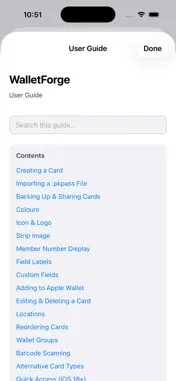
Apple Wallet is excellent at storing passes. It is not good at organizing them. Cards accumulate in a single undifferentiated stack with no grouping, no categories, no way to find the right card at a checkout without scrolling past everything else. WalletForge is a loyalty and membership card manager built around that problem. You keep your cards in WalletForge rather than — or in addition to — Apple Wallet, and the organizational tools are the point. Organization Cards are assigned to named groups — supermarkets, UK, gym, Belgium — and each group appears as a labelled, colour-coded section in the card list. Sections can be collapsed and expanded individually, so when you're travelling you can show only the cards relevant to where you are. Within a group, cards are reorderable by drag. Cover cards give each group a visual identity at a glance. Finding the right card Cards with saved locations show a location indicator in the list. When you're within range of a saved store, the indicator turns green. WalletForge can also surface the relevant card on your iPhone lock screen automatically when you approach a saved location — without opening the app. Getting cards in Type a card number, scan a photo of a barcode, or import an existing .pkpass file. WalletForge extracts the organisation name, member number, barcode format, colours, and logo from imported passes automatically. Brand colours can be sampled directly from a photo of the physical card. Backup and portability Your entire collection — cards, images, groups, locations — exports as a single .cardie file and imports cleanly on another device or after a restore. Duplicates are detected and skipped automatically. Apple Wallet Cards can be signed and added to Apple Wallet if you prefer to scan from there. The signing server runs on low power; first use after a long idle period can take up to 80 seconds.
Technical Analysis
Package Overview Basic metadata
Bundle ID
com.ropheb.walletforge Current Version 1.4.3 (28)
Minimum iOS 26.5
Package Size App Store Size
Package Metadata 0 / 0 version records
Detailed binary, privacy manifest, framework, and Info.plist results have not been indexed for this package yet. The verified App Store and archive metadata above remains available.
Known Version Records
0 version records with stored package metadata
Stored metadata does not guarantee a package is currently available to download.
| Details | Version / IDs | Version date | Action |
|---|