
Preview



Description
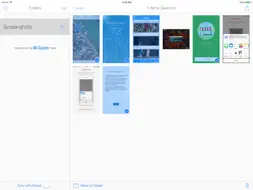
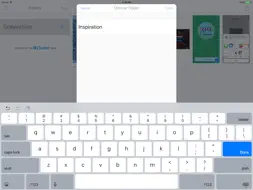
Screenshotter makes it incredibly simple to organize and manage the screenshots you take with your iPhone. It automatically identifies screenshots and makes it easy to organize them into folders. Here’s how it works: • Open the app and give it access to your camera roll. Screenshotter automatically displays your screenshots separate from your photos. • Tap select and choose multiple screenshots. • Tap “Move to Folder” and enter a name. The screenshots will be moved into a corresponding folder in iCloud Drive. It will now be magically available to all your devices and Mac computers. • For screenshots you don’t care about, tap the trash icon in the lower right. They will be removed from your Camera Roll. Created by the Cluster team
What's New
Version 2.6 2017-01-24
* Yikes! Fixed a bug where you couldn't select multiple screenshots in iOS 10 * iOS 9 users and up will now be able to see cropped and modified screenshots Technical Analysis
Package Overview Basic metadata
Bundle ID
com.getcluster.Screenshotter Current Version 2.6
Minimum iOS 8.0
Package Size Latest Recorded Package Size
Package Metadata 1 / 6 version records
3.5 / 5.0 (21 ratings)
Detailed binary, privacy manifest, framework, and Info.plist results have not been indexed for this package yet. The verified App Store and archive metadata above remains available.
Developer Information
Known Version Records
1 version record with stored package metadata • 6 known version records
Stored metadata does not guarantee a package is currently available to download.
| Details | Version / IDs | Version date | Action |
|---|---|---|---|
 8.86 MB | v2.6 App Store ID: 841452235Build: 9 | 2021-04-15 19:58:42 | Get Version |
| Not archived | App Store ID: 820671388 | Unknown | Request Version |
| Not archived | App Store ID: 811154732 | Unknown | Request Version |
| Not archived | App Store ID: 724062665 | Unknown | Request Version |
| Not archived | App Store ID: 583529413 | Unknown | Request Version |
| Not archived | App Store ID: 414312651 | Unknown | Request Version |