
Preview






Description
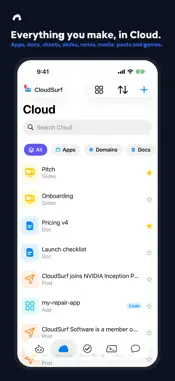
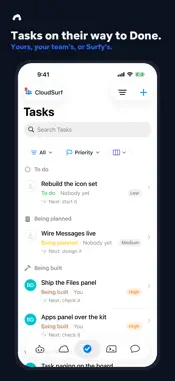
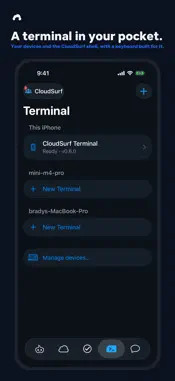
CloudSurf is the workspace app for iPhone and iPad by CloudSurf Software LLC. Surfy, the built-in assistant, turns a chat into something real: describe an app, a site or a document, and Surfy builds it. Chat to app. BUILT FOR IPHONE DUO CloudSurf works in every pose. Closed portrait and closed landscape: the cover screen carries the whole app with a rail of tabs beside the status cluster. Open landscape: Tasks and Messages sit beside the Desk — the list on the left, what you opened on the right — and Cloud and your docs take the whole screen. Open portrait: a full-height page. Tabletop: folded halfway, the top half is the screen with a dock above the hinge and the bottom half a keyboard and trackpad — a little computer in your pocket, with a pointer that clicks everything. Appearance is System, Light and Dark, and Dark is Surf Dark, CloudSurf's navy. THE FIVE TABS • Surfy — the home tab: your conversation with Surfy, ready the moment the app opens. Say what you want made and Surfy writes the doc, builds the app or site, and shows you as it works. • Cloud — what you make and keep, newest first, with the kinds from your workspace: Apps, Domains, Docs, Sheets, Slides, Notes, Images, Videos, Audio, Files, Posts, Starred and Games. An app's page holds its web page, its code repositories (Code) and its look (Look): the style, the accent, the fonts, Light, Dark or Auto. • Tasks — what needs to be done, on its way to Done, with a search field and the status and source menus beside the title. • Terminal — a real terminal, fourth on the bar: this iPhone's own CloudSurf shell, every Mac of yours that is online, and Surfy as a command line. CloudSurf's own keyboard sits above the tab bar (esc, tab, ctrl, alt, the arrows, a symbols layer) with a Settings key for the theme, text size and cursor; black with green text by default. Your devices and their files live under Settings › Workspace. • Messages — every conversation with your workspace's members, each in its own thread. Every tab keeps its own place: a page opens under the system's own bar, and Back or a swipe from the edge returns you where you were. The + button floats at the bottom right of every tab but Surfy and opens one New sheet — a doc, a task, an app, a site, a message. The menu button at the top left reaches your account, Notifications and Settings; the workspace switcher stands at the top right. SURFY • Surfy is the home tab, one tap away from any other, and Surfy rides along: open a doc or an app and the Ask Surfy bar at the foot of the page edits it with you. • Talk out loud in Voice Mode. Surfy's ear stays open for the whole conversation and hears the end of what you say, and you can talk over Surfy to stop it. Surfy's voice is made on your phone, and what you say is turned into words on the device when it can be. • Surfy has a face: a small robot that listens, thinks and talks back as it works. Customize Surfy changes its look. • Add photos and videos from the bar and ask Surfy about them. ONE ACCOUNT, EVERY SURFACE Workspaces are shared with their members. The same account works on the web at app.cloudsurf.com and on the Mac, so what you start on your phone is waiting on your desk. PLANS • Free — $0: the app, your workspaces and documents; no cloud Surfy credits. • CloudSurf Pro — $20.00/month per member: 3,000 Surfy credits a month. • CloudSurf Ultra — $200.00/month per member: 30,000 Surfy credits a month. • Credit packs — Small: 500 credits · Medium: 2,100 credits · Large: 5,750 credits, each a one-time purchase at the price shown in the app. Purchased credits never expire. Subscriptions renew monthly until cancelled at least 24 hours before the end of the current period; manage them in Settings › Apple Account › Subscriptions. Terms of Use: https://www.apple.com/legal/internet-services/itunes/dev/stdeula/ Privacy Policy: https://cloudsurf.com/privacy
What's New
Version 1.36.0 2026-11-07
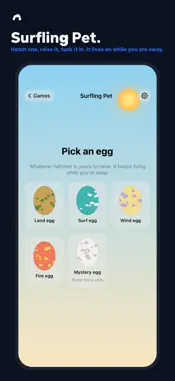
Apps hold their code and their look, and the games round. • Cloud's kinds now come from your workspace: All, Apps, Domains, Docs, Sheets, Slides, Notes, Images...Apps hold their code and their look, and the games round. • Cloud's kinds now come from your workspace: All, Apps, Domains, Docs, Sheets, Slides, Notes, Images, Videos, Audio, Files, Posts and Starred, with Games closing the grid. Code left the kinds; an app row reads App with small chips for what it has — Web, Code (or Code · 2) and Domain. • An app's page has two new views. Code lists the app's repositories with Add repository (New, Link GitHub, Import), and for each Open, Clone, Role, Make primary and Unlink. Look shows the app's own home page in each style as cards: tap one to change the style, Go back to undo, then the accent, the heading and text fonts, Light, Dark or Auto, and Edit CSS on the web. • Import › Code Repo on every New sheet: bring a repository in as a Code row or into an app. • The app icon: white ceramic by default, with a frosted-glass alternate in Settings. • When Surfy stops for a limit, the card names which limit and has one Upgrade button. The games: six now, every one full screen on every iPhone and the iPhone Duo, with a joystick or a d-pad (your pick in Settings) and a swipe to look. • Surfling Wilds has a compass under the title, a painted world of sky, clouds, mesas and surf, solid trees, towns with townsfolk who walk their day (press A to hear them; Talk and Surfy speaks as them), and castles with trainers, a boss and a badge that raises the level your team obeys. A interacts, B throws the Pod, berries live in the Bag in the Start menu. • Surfling Pet, a fifth game: pick an egg, hatch it, and raise one Surfling that lives on while you are away. • Surfling World, a sixth game: a small planet of Surfling nations that found themselves, trade, go to war and climb twelve ages from rocks to rockets while you watch. Miracles from a tray, lightning on a long press, a word the nations weigh by their faith in you; pinch in and the globe becomes the ground of one tile. Technical Analysis
Package Overview Basic metadata
Bundle ID
com.cloudsurf.mako Current Version 1.36.0
Minimum iOS 26.0
Package Size App Store Size
Package Metadata 0 / 0 version records
Detailed binary, privacy manifest, framework, and Info.plist results have not been indexed for this package yet. The verified App Store and archive metadata above remains available.
Developer Information
Known Version Records
0 version records with stored package metadata
Stored metadata does not guarantee a package is currently available to download.
| Details | Version / IDs | Version date | Action |
|---|