
Preview


Description
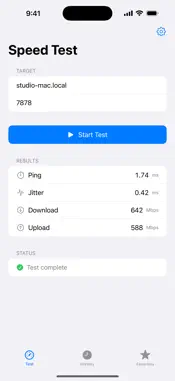
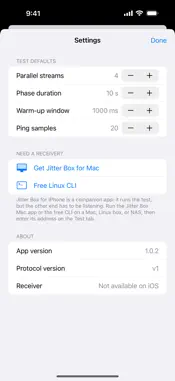
Jitter Box for iPhone measures the real speed of the link between your phone and another device on your network — a Mac, a PC, a NAS, a Linux box, anything running a Jitter Box receiver. Run a test and find out exactly what your Wi-Fi, your router, or that far corner of the house is actually capable of. No third-party servers, no telemetry, no sign-up. A COMPANION APP Jitter Box for iPhone is the client end of a peer-to-peer speed test: it runs the test, but the other end has to be listening. The easiest pairing is the Jitter Box app for Mac, which acts as the receiver with a single switch. There's also a free command-line receiver for Linux, macOS, and Windows if you'd rather test against a server, NAS, or home lab box. Most people use it alongside the Mac app. • Get Jitter Box for Mac: https://apps.apple.com/app/id6771647762 • Get the free command-line receiver: https://jitterbox.app/cli/ USE IT TO • Find the Wi-Fi dead spot in your house ("is it the bedroom, or my router?") • Sanity-check a new mesh node, access point, or cable before you blame the ISP • Compare two rooms — or two phones — on the same Wi-Fi to spot a flaky radio • See what your phone really gets from the network, room by room WHAT IT MEASURES • Median ping over 20 samples — robust to a single hiccup • Jitter, the mean variation between consecutive round-trips • Download throughput, across 4 parallel TCP streams, with a warm-up window discarded so you see the steady-state number • Upload throughput, same methodology in the other direction • A local history of every test, plus saved favorites for the peers you test most WHY PEER-TO-PEER Most speed-test apps shake hands with a server in a data centre and report the whole path between you and that server. That's useful for "is my ISP delivering what I pay for" — but useless for "is my home Wi-Fi OK". Jitter Box only ever talks to a device you choose on your own network, so the numbers reflect exactly the link you care about. PRIVACY No analytics. No telemetry. No third-party SDKs. Your test history lives entirely on your iPhone and never leaves your device. REQUIREMENTS • A receiver on the same local network: the Jitter Box Mac app, or the free command-line tool (Linux / macOS / Windows) • iOS 17 or later • An iPhone (the app is iPhone-only)
What's New
Version 1.0.2 2026-06-07
Refined wording: the free command-line receiver is now described as the "Linux CLI" (previously "Raspberry Pi") in Settings and on the App Store. No functional ... Technical Analysis
Package Overview Basic metadata
Bundle ID
com.cloudmanic.jitterbox.mobile Current Version 1.0.2
Minimum iOS 17.0
Package Size App Store Size
Package Metadata 0 / 2 version records
Detailed binary, privacy manifest, framework, and Info.plist results have not been indexed for this package yet. The verified App Store and archive metadata above remains available.
Developer Information
Known Version Records
0 version records with stored package metadata • 2 known version records
Stored metadata does not guarantee a package is currently available to download.
| Details | Version / IDs | Version date | Action |
|---|---|---|---|
| Not archived | App Store ID: 886648685 | Unknown | Paid / Arcade |
| Not archived | App Store ID: 886400488 | Unknown | Paid / Arcade |