Preview


Description
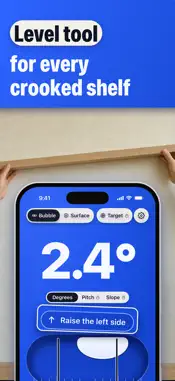
Level Tool turns your iPhone into a spirit level and angle finder. Hold it against an edge or lay it on a surface, and the reading shows the tilt to a tenth of a degree. When it is level, the background behind the reading turns green and the phone taps once. Hang a frame, put up a shelf, mount a TV or set a washer on its feet by eye, and you often end up drilling a second hole. Level Tool tells you which side to raise before you drill. TWO TOOLS - Bubble: hold the phone against the top of a frame, a shelf or a TV, upright or on its long edge. It reads the angle of any edge, so it also works as an angle finder and an inclinometer. - Surface: lay the phone face up on a table, a floor or an appliance. It reads side to side and end to end, and tells you which corner to raise. MADE TO READ FROM A LADDER - The angle fills the screen in large digits. - The background behind the reading turns green when it is level, with one tap from the phone and a soft tick you can switch off. - A line under the reading says which side to raise. - Hold freezes the reading, so you can lift the phone off a rafter and read it. CALIBRATE WITH THE CASE ON Calibrate each tool in two steps on any flat table, with the case on. Lay the phone flat for Surface, or stand it on its long edge for Bubble, then turn it around on the same spot. That allows for your case and the camera bump. FOR RVS AND CAMPERS Lay the phone on the floor of an RV or camper, and Surface shows which way it leans and which corner to raise. PRO: ROOF PITCH, SLOPE AND A TARGET ANGLE Pro adds two units to the reading: roof pitch in x/12 and slope in percent. To read a roof, lay the phone flat on a rafter with Surface, or stand it on its long edge along the rafter with Bubble. Pro also sets a target, such as 4/12 or 6/12 for a roof, 2% for drainage or 45°, and the phone taps when you hit it. Bubble, Surface, degrees, Hold and calibration all work without Pro. If you bought Pro in an earlier version, it carries over. Level Tool shows no ads and needs no account. The level works without an internet connection. It does not measure length or distance. Check the next frame you hang before you drill. Terms of Use: https://cmlapps.github.io/leveltool/terms.html Privacy Policy: https://cmlapps.github.io/leveltool/privacy.html
What's New
Version 2.0 2026-10-29
Level Tool 2.0 is rebuilt from the ground up. Bubble reads any edge and Surface reads a flat top, both to a tenth of a degree. The background behind the reading...Level Tool 2.0 is rebuilt from the ground up. Bubble reads any edge and Surface reads a flat top, both to a tenth of a degree. The background behind the reading turns green when it's level, and a line tells you which side to raise. Bubble and Surface work without Pro, with no timer. Calibration takes two steps for each tool and allows for your case. Pro adds roof pitch in x/12, slope in percent and a target angle that taps when you hit it. If you bought Pro before, it carries over. Technical Analysis
Package Overview Basic metadata
Bundle ID
com.cloudmotionlab.levelapp Current Version 2.0
Minimum iOS 17.0
Package Size App Store Size
Package Metadata 0 / 2 version records
Detailed binary, privacy manifest, framework, and Info.plist results have not been indexed for this package yet. The verified App Store and archive metadata above remains available.
Developer Information
Known Version Records
0 version records with stored package metadata • 2 known version records
Stored metadata does not guarantee a package is currently available to download.
| Details | Version / IDs | Version date | Action |
|---|---|---|---|
| Not archived | App Store ID: 883618387 | Unknown | Request Version |
| Not archived | App Store ID: 883369905 | Unknown | Request Version |