
Preview



Description
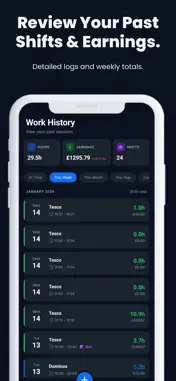
Worker Tracker – Time Tracking helps you track work sessions, breaks, and earnings fast and accurately. Whether you work part-time, freelance, or manage multiple jobs, Worker Tracker – Time Tracking keeps your logs organized and turns them into clear, useful insights. Track your work with confidence • Clock in/out with a live session timer • Start and end breaks with automatic tracking • Add manual logs for past shifts (edit anytime) • Prevent common mistakes with time validation Manage multiple jobs • Create jobs with custom names, colors, and icons • Set hourly rates (and optional tax rate) • Switch jobs quickly when logging time Goals & insights • Set a weekly hours goal and view progress at a glance • Daily breakdown chart to see when you worked most • Statistics for weekly, monthly, and yearly performance • Earnings analysis, job distribution, and recent logs Export & backup • Export your work history to CSV for sharing or reporting • Optional cloud sync to back up and restore your data across devices Customize your experience • Dark mode • Choose your currency symbol • Simple, clean interface designed for speed Worker Tracker – Time Tracking is built for people who want a lightweight way to track hours and understand earnings without spreadsheets. Download Worker Log – Time Tracking and make every shift count.
What's New
Version 1.0.14 2026-03-06
Pay Period Settings Configure how you get paid with flexible pay period options: • Monthly – Set a specific pay day (1st–31st) • Bi-weekly – Every 2 weeks with... Technical Analysis
Package Overview Basic metadata
Bundle ID
com.workertracker.app Current Version 1.0.14
Minimum iOS 15.1
Package Size App Store Size
Package Metadata 0 / 2 version records
Detailed binary, privacy manifest, framework, and Info.plist results have not been indexed for this package yet. The verified App Store and archive metadata above remains available.
Known Version Records
0 version records with stored package metadata • 2 known version records
Stored metadata does not guarantee a package is currently available to download.
| Details | Version / IDs | Version date | Action |
|---|---|---|---|
| Not archived | App Store ID: 883074392 | Unknown | Request Version |
| Not archived | App Store ID: 881458042 | Unknown | Request Version |