
Preview


Description
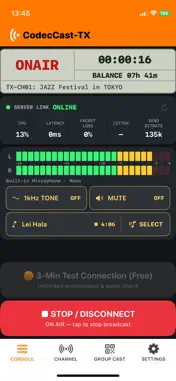
CodecCast TX — Professional Live Audio Broadcasting Turn your iPhone or iPad into a professional-grade audio transmitter. CodecCast-TX streams high-quality stereo audio in real time to CodecCast-RX receivers, giving broadcasters, event crews, and field reporters a fast, reliable way to go live — without heavy hardware. Built around a broadcast-console interface, CodecCast-TX keeps the controls you actually need — input levels, link status, and on-air state — clear and immediate. KEY FEATURES High-quality stereo streaming Send full stereo audio in real time using a music-optimized codec. Connect a USB audio interface or wired headset for true left/right capture; mono sources are sent as clean dual-mono. Flexible audio input Automatic input selection prioritizes USB, then wired, then Bluetooth, then the built-in mic — or pick a device manually. Live input metering with professional PPM-style ballistics lets you set levels with confidence. Free 3-minute test Check your audio and connection with a free 3-minute test broadcast before you commit to going live. Channels and instant QR join Create up to 99 named channels. Show a QR code and listeners join in seconds — no logins, no setup. A separate ADD-TX QR lets multiple transmitters broadcast into the same channel together (GROUP CAST). See who's connected View the receivers and transmitters on each channel, complete with organization name, device name, and online status. Reference tone and instant mute Send a 1 kHz, -18 dBFS line-up tone for level alignment, and mute instantly whenever you need to. Connection monitoring Keep an eye on server link status, latency, packet loss, jitter, and bitrate, and run a line-quality check before you go on air. Broadcast time that stays yours Broadcasting uses broadcast time (minutes). Buy additional minutes anytime as one-time in-app purchases — no subscriptions. Your balance is tied to your installation and can be moved to a new device by QR transfer, or restored with your Apple ID. Set your identity Name your organization and device so receivers always know exactly who's on air. HOW IT WORKS 1. Open CodecCast-TX and create a channel. 2. Show the channel QR code to your listeners. 3. Listeners scan it with CodecCast-RX and start receiving automatically. 4. Press ON AIR — you're live. WHO IT'S FOR • Radio and broadcast crews needing a quick remote or backup feed • Live events, houses of worship, and conferences distributing audio to staff or attendees • Field reporters and journalists filing live audio • Anyone who needs simple, high-quality, real-time audio distribution NO ACCOUNT REQUIRED Get started right away. CodecCast TX doesn't ask you to create an account. CodecCast-TX is the transmitter app. To listen, install CodecCast-RX on your receiving devices. Broadcast time is sold as consumable in-app purchases, and prices are shown in the app before you buy. Real-time performance depends on your network conditions.
What's New
Version 1.1 2026-07-31
Purchase restore has been redesigned. The former "Restore Purchases" screen is now "Account & Restore" in Settings, where you can optionally register with Sign ... Technical Analysis
Package Overview Basic metadata
Bundle ID
com.codeccast.tx Current Version 1.1
Minimum iOS 16.0
Package Size App Store Size
Package Metadata 0 / 0 version records
Detailed binary, privacy manifest, framework, and Info.plist results have not been indexed for this package yet. The verified App Store and archive metadata above remains available.
Developer Information
Known Version Records
0 version records with stored package metadata
Stored metadata does not guarantee a package is currently available to download.
| Details | Version / IDs | Version date | Action |
|---|