Preview







Description
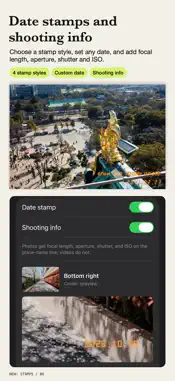
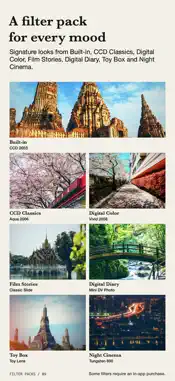
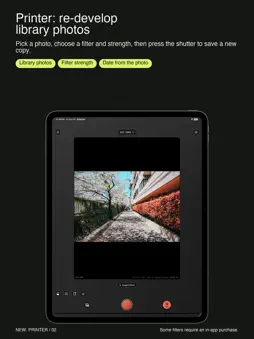
Make today look like a memory. RilaCam turns your iPhone into a pocket retro camera. Capture CCD shadows, early digital softness, or VHS scan lines and color drift. PRINTER Tap PRINTER, pick a photo, choose a filter and its strength, then press the shutter. The print slides out and is saved as a new photo; the original stays as it was. Stamps use the photo's own date, place, and shooting info, and prints can develop slowly. WHITE FRAMES Turn on the frame for a white border on new photos and prints (square, portrait, or landscape) without cropping. Place and shooting info can be handwritten on the bottom edge. MANUAL CONTROLS Use the shutter dial (1/4000 to 1/30 s by lens; photos down to 1 s), exposure compensation in 1/3 steps, white balance (cloudy, daylight, fluorescent, incandescent, or auto), and a 3, 10, or 30-second self-timer. Double-tap the dial for auto. ZERO PROCESS Choose it in Settings › Capture › Processing to develop photos from a single RAW frame, without iPhone's multi-frame fusion, sharpening, or noise reduction, then apply your filter. Still saved as HEIF or JPG, with optional HDR on iOS 18+. Needs a RAW-capable lens. CHOOSE A LOOK BEFORE YOU SHOOT Preview filters live while you frame a photo or video, then adjust the intensity you want. RilaCam remembers each filter's intensity. Star the filters you use most and they come first when you swipe the viewfinder. Filters, grain, and date stamps work on photos and video. KEEP THE DATE AND THE PLACE Choose a CCD dot-matrix, quartz date back, soft film, or VHS stamp, set a custom date, or add focal length, aperture, shutter, and ISO. Optional place names need network access and location permission. FRAMING AND CONTROLS Pick from 5 camera bodies, then use composition guides, front and rear cameras, and device-supported zoom. On supported iOS 18+ hardware, Camera Control switches filters and adjusts zoom and exposure up to 10×. Works on iPad and iPhone Duo. An optional Level and Histogram appear only in the viewfinder. START WITH SEVEN FREE FILTERS CCD 2003, Pocket 4, Warm Date, Night CCD, VHS 1994, and the food looks Tokyo Café and Hot Wok need no filter pack. Preview any style; saving with a premium filter requires its pack, All Filters Lifetime, or an active All Filters Monthly subscription. YOUR WORK STAYS ON YOUR DEVICE Photos and video are processed on-device. Save to your photo library, then view, play, and share in the Album. RilaCam supports iPhone and iPad with iOS 17 or later. Photos export in JPG or HEIF. Video is 720p or 1080p where supported. Lenses, zoom, and flash depend on the device. OPTIONAL FILTER PACKS Buy any pack once and keep it; no subscription needed. Restore with the same Apple ID: • CCD Classics: Aqua 2006, Flash Party, Silver Compact, Green Memory. • Digital Color: Tokyo Standard, Vivid 2008, Soft Portrait, Candy Pink, Kyoto Walk. • Film Stories: Classic Slide, Negative 90, Nostalgia 1976, Mono 400, Pastel 400. • Digital Diary: Mall 2005, Cyber Café, Mini DV Photo, Blue Hour. • Toy Box: Disposable 400, Toy Lens, Redscale, Fisheye. • Night Cinema: Tungsten 800, Anamorphic, Super 8, Push 3200. ALL FILTERS LIFETIME One purchase unlocks every pack permanently, including future packs. It does not cancel a monthly subscription. ALL FILTERS MONTHLY — OPTIONAL SUBSCRIPTION Access all premium filters with an auto-renewable monthly subscription. The local price is shown in the app and on the App Store purchase sheet. Payment is charged to your Apple Account when you confirm. The subscription renews monthly unless you cancel at least 24 hours before the current period ends. Manage or cancel it in your Apple Account settings. After cancellation, access continues until the paid period ends; permanently purchased packs remain available. Privacy Policy: https://rilacam.peterlee.app/privacy/ Terms of Use (EULA): https://www.apple.com/legal/internet-services/itunes/dev/stdeula/
What's New
Version 2.1.0 2026-11-05
What's new in 2.1.0: • Two free food filters: Tokyo Café, bright and creamy for desserts and light meals, and Hot Wok for stir-fry spots under fluorescent ligh...What's new in 2.1.0: • Two free food filters: Tokyo Café, bright and creamy for desserts and light meals, and Hot Wok for stir-fry spots under fluorescent light. • New All Filters Lifetime: one purchase unlocks every filter pack permanently, including packs released later. • Filter packs now have their own sample photos in the filter browser and purchase screens. • Printer recommends the food filters first when it recognizes food. Technical Analysis
Package Overview Basic metadata
Bundle ID
com.peterlee.rilaCam Current Version 2.1.0
Minimum iOS 17.0
Package Size App Store Size
Package Metadata 0 / 0 version records
Detailed binary, privacy manifest, framework, and Info.plist results have not been indexed for this package yet. The verified App Store and archive metadata above remains available.
Developer Information
Known Version Records
0 version records with stored package metadata
Stored metadata does not guarantee a package is currently available to download.
| Details | Version / IDs | Version date | Action |
|---|